
Schedule ticket availability or add a waitlist to an event
A scheduled ticket is only on sale between a start date and an end date that you set on the ticket itself. Scheduled tickets replace what was previously called early bird tickets: instead of checking an early bird option, you now define the ticket's availability window.
Schedule a ticket
Scheduling is configured on each ticket rate from the form editor, on a desktop.
Log in to your dashboard on a desktop.
Go to "Campaigns" and click "Edit" to the right of your event form.
Go to the "Tickets" step.
Click "Options" on the ticket you want to schedule.
Set the start date: choose the start date of your campaign, or a custom date of your choice.
Set the end date: choose the end date of your campaign, or a custom date of your choice.
Save your changes.
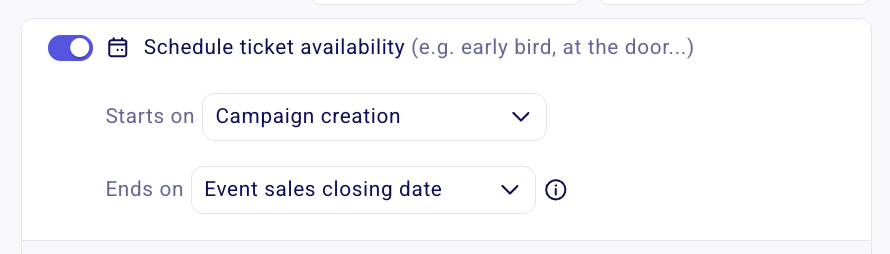
You can set both dates or just one of the two, depending on what the ticket needs. Before the start date and after the end date, buyers cannot purchase that ticket. The rest of your form keeps selling normally.
Common scheduled ticket setups
Early bird pricing
Sell a discounted rate for a limited time: create a ticket with your early bird price, then in "Options" set its start date to the start date of the campaign and its end date to a custom date of your choice.
Full-price tickets that start when early bird ends
Release the full-price rate as soon as early bird closes: create a ticket with your full price, then in "Options" set its start date to a custom date (the day early bird ends) and its end date to the end date of the campaign.
Hiding vs closing a ticket
Scheduling and closing are two different controls, and they apply at different levels:
Scheduling a ticket (the closest thing to hiding) changes the availability of a single ticket rate. Before its start date and after its end date, that ticket is not on sale; everything else on the form keeps selling.
Closing sales stops sales for the whole form, for every ticket at once. Set an automatic sales close date in the "Date" step, or close sales manually from your dashboard. See How to set an automatic sales open and close date or close ticket sales manually.
Zeffy does not have a separate "hide" toggle for tickets. Scheduling is how you keep a ticket off sale before it opens or after it ends. See Can I hide certain tickets on my Zeffy form?.