
How to update names of my event guests after their purchase
How can I edit the e-ticket to change the guest's name/information or their answers to my custom questions?
Zeffy's E-tickets are PDF documents that are automatically generated using the information provided during purchase. Once generated, these PDF documents cannot be modified directly.
When you edit a guest's name, the PDF e-ticket stays the same, but the buyer's online ticket updates. Buyers get a link to their online ticket in their confirmation email, where they can see the ticket details, add the ticket to their wallet, or download the PDF. If your guest needs a new PDF that shows the updated name or information, you will have to issue a new ticket for them.
To issue a new ticket for a ticket buyer, you can follow the steps outlined here: Change an order for a buyer
Where can I update my attendee's names if they have changed after the purchase is complete?
You can update a guest's name (and email) after the purchase from the guest details drawer: click the edit icon next to the guest's name. This works whether or not your form collected each guest's name, and requires the Manage payments permission.
💡 When a buyer purchases multiple tickets, you can easily ask for the first and/or last names of each attendee. This will allow you to generate an accurate guest-list ahead of your event. To ensure your form has been set up correctly to do so please see our detailed guide here:Obtain all event attendee names when multiple tickets are purchased
Updating attendee names after the purchase won't change the PDF e-ticket, but the change shows on the buyer's online ticket, in your Zeffy dashboard and in your exports.
To do so you can either:
Edit the custom question answer in their order directly:
To edit the answer, go to Payments > search for their payment and click on it (do not click the contact name as this will take you to their contact page, click anywhere else on the payment line to open the details) > when the payment drawer opens, you will see that you are able to edit the answers recorded in their order.
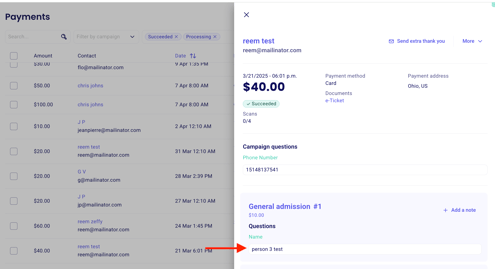
After you edit an answer, confirm it by selecting the check mark (or pressing Enter). Once confirmed, the change is saved and shows in the payment export you get from Zeffy.
Note that changing the order in this way will not change the answer recorded on the e-ticket.
Edit the custom question answer in their order directly:
You can follow the instructions found on this page to learn how to change a ticket type or an order for a buyer. The process essentially involves cancelling the tickets they have without issuing a refund and issuing new tickets manually with a discount code applied to have the payment recorded once and new e-tickets issued.
🌟 Although you cannot edit PDF e-tickets at the moment, there is an official feature request open for this idea, we invite you to upvote and comment this idea here to help our team prioritize your suggestion!