
The field shows Enter an ID that starts with G- when the ID isn't a GA4 measurement ID. Check that yours starts with G- and has no spaces. If you copied it from a document, type the hyphen again: some editors replace it with a lookalike character.
How can I integrate Zeffy with Google Analytics?
Connect a campaign to your Google Analytics 4 property to see how many people visit your form and where they come from. You turn it on yourself in the campaign editor, with your GA4 measurement ID.
What you can track
The integration sends page views and traffic sources to Google Analytics. It also works when your form is embedded on another website.
Tracked: visits to your form and where those visitors came from.
Not tracked: conversions, completed donations or ticket purchases, donation amounts, and clicks inside the form.
Due to Law 25, the Google Analytics integration is not available to Canadian organizations: the setting is greyed out in the campaign editor.
Before you start
We support Google Analytics 4 only. You need the measurement ID of a GA4 property, which starts with G- (for example G-XXXXXXXXXX). In Google Analytics, you find it in Admin > Data streams, on your web stream.
Only team members with the Bank, Add and remove users, or Contacts & Communications permission can change this setting.
Turn on Google Analytics
Go to Campaigns and click Edit on your campaign.
Open Advanced settings.
Below all the advanced settings, click More options.
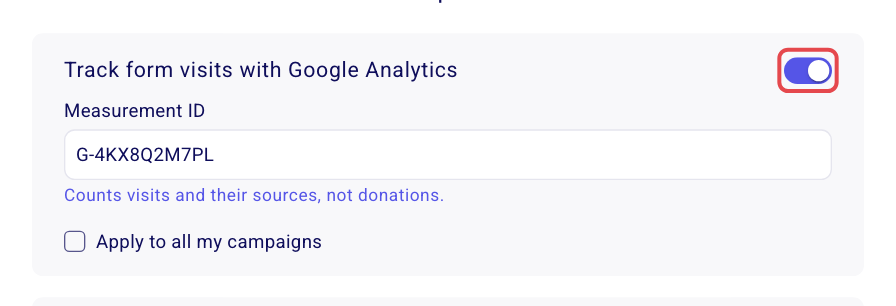
Turn on Track form visits with Google Analytics.
In Measurement ID, paste your measurement ID.
Click Save & exit.
Track all your campaigns in the same property
By default, only the campaign you are editing is tracked. Tick Apply to all my campaigns to send page views from all your existing campaigns, and every campaign you create from now on, to this Google Analytics property.
See your form's page views in Google Analytics
Page views for your form show up as the page_view event in your GA4 property.
In Google Analytics, go to Reports > Engagement > Events.
Open the page_view event to see views and their details.
To check that tracking works right away, open the Realtime report in GA4 and visit your form. Your visit appears there as live traffic.
Track completed donations as conversions
The Google Analytics integration shows how many people visit your form and where they come from. It doesn't track conversions, so donations and ticket purchases don't appear as conversions in Google Analytics. Conversion tracking with Google Tag Manager or ad tags such as Google Ads isn't supported on Zeffy forms or on the Zeffy Thank You page. See Track ads and conversions on your Zeffy campaigns.
To measure completed donations, you can:
Redirect donors to your own thank-you page. Donors reach it only after a completed transaction, so your own conversion tracking (GA4 events, Google Ads, Google Tag Manager) can fire there. See How to Redirect Donors to a Custom Thank You Page.
Add UTM parameters to the links you share. The source is saved with each successful donation, in the donation details and in your exports. See Set-up UTM parameters & source tracking.
Use your Zeffy dashboard for the number and amount of donations.
Common questions
My measurement ID isn't accepted
I use different Google Analytics properties for different campaigns
Each campaign sends its page views to one measurement ID. Set the ID campaign by campaign and leave Apply to all my campaigns unticked, otherwise every campaign goes to the same property.
Google Analytics shows no data
Check that the switch is on and the ID is saved on the campaign people are visiting, then visit your form and open the Realtime report. Standard reports in Google Analytics can take a day or two to show new data.
Was this helpful?
Was this helpful?