
Everything there is to know about monthly or yearly membership renewals
When setting up your memberships on Zeffy, you can choose from four different renewal options: Monthly, Yearly (365 days), Yearly (on a specific date) or No Expiration.
🔁 Activating Renewal
In your Zeffy dashboard, go to campaigns andclick on edit to the right of your membership form. There, set the desired validity period of monthly or yearly to propose automatic renewal to members.
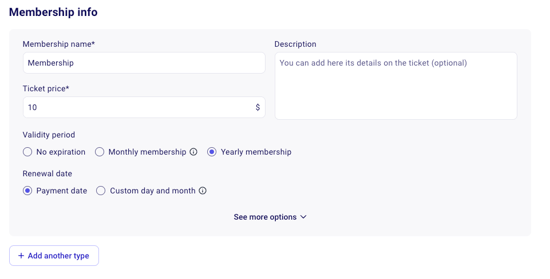
The membership will be renewed on the payment method used during the first membership purchased but members always have the ability to update their payment method in their account.
Here's how each renewal schedule works:
1️⃣ Monthly Memberships
For memberships with monthly renewal, payments will renew every month on the same day as the initial membership purchase.
Automatic renewal is selected by default on all membership forms, including monthly memberships. Members can unselect this option during payment if they do not want their membership to renew automatically.
How it works:
Renewal Date: The membership will renew exactly 30 days after the sign-up date. For instance, a membership purchased on the 1st of January, the membership will renew on the 1st of each following month.
Confirmation: Members receive your customized thank you email each month when the payment goes through.
Cancellation: Members can cancel monthly renewals anytime from their account. Memberships can also be stopped by the non-profit in their Zeffy admin account.
2️⃣ Yearly Memberships - renewal after 1 year
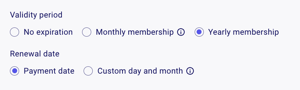
For yearly memberships whose renewal date is set to "payment date", memberships will renew exactly 365 days after sign-up.
How it works:
Renewal Option: The automatic renewal on yearly memberships is optional. Members can choose to to opt-out of automatic renewal during their payment.
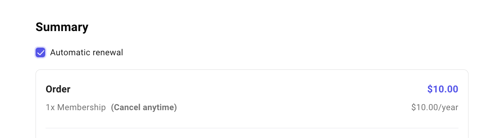
Renewal Date: Annual memberships automatically renew 365 days after the initial membership purchase.
Expiration Reminders: Members get an email reminder 30 days before their membership expires. If they’re set up for automatic renewal, this reminder will confirm their card will be charged. Otherwise, it prompts them to go and purchase a new membership manually.
3️⃣ Yearly Memberships - custom day and month
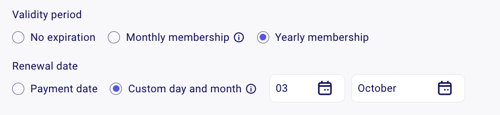
Yearly memberships can also be set to renew on a specific day and month for all members, regardless of the purchase date. This type of membership is ideal if you need everyone on the same renewal schedule.
How it works:
Renewal Option: The automatic renewal on yearly memberships is option. Members will be able to select whether or not they'd like their membership automatically renewed via a checkbox during the payment process.
Renewal Date: All memberships will expire on the set date, regardless of sign-up date.
Note: Fixed expiration dates are "year-blind"—the renewal doesn’t adjust based on the year and will instead renew on the next occurrence of the specified date.
Grace Period: The membership form has a 3-month grace period, so if a member signs up within three months of the set expiration, their membership expiration will carry over to the next year.
Expiration Reminders: Members get an email reminder 30 days before their membership expires. If they’re set up for automatic renewal, this reminder will confirm their card will be charged. Otherwise, it prompts them to go and purchase a new membership manually.
🌟 Members which have been manually added will receive an expiration notice as well!
4️⃣ No Expiration Memberships
If you would prefer for memberships not to expire or renew, you can opt for the No Expiration option.
How it works:
No Renewal Needed: Since there’s no expiration date, these memberships don’t renew.
No Expiration Reminders: Members won’t receive any expiration notices or reminders for these memberships.
Discounts and Additional Donations
When a member signs up with a discount code or adds an additional donation to their membership purchase, these only apply to the first payment. Automatic renewals will charge the full membership price without the discount or additional donation.
Duration Limitations and Workarounds
Zeffy currently offers monthly, yearly, and no expiration membership durations. A specific 6-month (semi-annual) duration is not available, but you can achieve similar results using these workarounds:
Option 1: Use Monthly Memberships
Members can sign up for a monthly membership and manually cancel after 6 months
Provides flexibility for members who want shorter-term commitments
Requires members to actively manage their membership duration
Members can cancel from their donor account, or you can stop the renewal from your admin Payments section
Option 2: Use Yearly Memberships with a Custom Renewal Date
Set up the membership to expire on a specific date (e.g., June 30 and December 31)
Members renew twice a year on fixed dates, creating a semi-annual rhythm
Keep the 3-month grace period in mind. If a member signs up within three months of the set expiration date, their membership will carry over to the next year. For example, if your expiration date is December 31, a member who signs up in October will have their membership valid through the following December 31.
Both approaches ensure members receive the standard 30-day expiration reminder before their membership ends. For yearly memberships with automatic renewal, members can opt out during the payment process, or you can stop automatic renewals at any time from the Payments section.
If you'd like to see more flexibility in membership duration options, you can vote for this feature request: More flexibility with renewal options.
Adjusting Rates or Expiration Dates on renewing memberships
Changing the price, expiration date, or other details of an existing membership affects all current members with that membership. For example, if you update the "General Membership" rate or expiration in your settings, all existing members under that plan will renew at the updated terms.
To have current members renew at the new price, update the price on the existing membership tier. Do not delete the existing tier and create a new one, as this will cause members to renew at the old price.