
Enabling cash/offline bids on your auction form
Cash or offline bids are designed to complement online bidding—not replace it.
They allow bidders who prefer not to enter a card online to place a bid, then pay your organization outside of Zeffy if they win. For example, you may accept online card bids while offering an offline option for bidders who would rather pay later by cash, cheque, e-transfer, or another arrangement.
If an offline bidder wins, Zeffy will not charge them automatically. Your organization is responsible for collecting and recording their payment.
How to enable cash or offline bids
In your Zeffy dashboard, go to Fundraising → Campaigns.
Find your auction form and click Edit.
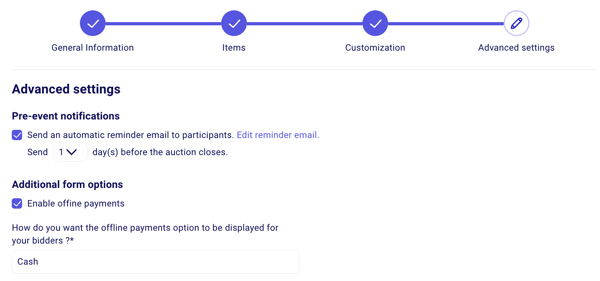
Open Advanced settings in the form editor.
Enable Allow offline payments.
Optionally, customize the name shown for this option - for example, “Cash or cheque” or “Pay by e-transfer.”
Note that if a bidder places several bids using different payment methods, the payment method attached to their highest, winning bid is the one that applies. For example, if they first bid by card but later submit a higher bid using the offline option, their card will not be charged. You will need to collect the winning amount offline.
What happens when a bidder selects an offline payment method?
When offline bids are enabled:
Bidders can place a bid without entering card details.
If they win, Zeffy will not automatically charge them.
You collect the payment directly from the winner, using the method you arranged with them.
The winning bid will automatically appear as a payment in your auction transactions, so there is no need to log it separately for your auction totals to be accurate. It will be listed with an offline payment method rather than credit card to distinguish it.
Important: A connected bank account is required, even for offline auctions
While you can enable offline bids as an additional payment method to credit card bidding, it is not possible to disable online card payments fully. This means auction forms cannot be used for cash-only bidding (the credit card option will always be visible).
As such, a connected and verified organizational bank account is still required, even if you expect most - or all - bidders to choose the offline option. Zeffy requires this setup before anyone can submit a bid through an auction form.
Complete your account verification and connect a bank account in your organization’s name before sharing the auction form. For more information, see Stripe Verification Overview.
Until your bank account is connected, the only auction option available is logging payments manually from your dashboard. Manual entries cannot be assigned to an auction form, so you would record the payment on another form, such as a custom sales form.
Silent auctions vs live in-person auctions
Zeffy's auction feature is designed for online silent auctions, where bids come in through your auction form. If you are hosting a live in-person auction instead, collect payments on the spot using the Zeffy Tap to Pay app or a form's QR code on a donation form. See How to handle in-person auction payments for that setup.