
Can I set a start date for my online auction?
Managing When Bidding Begins
You can set an automatic bid opening date for your auction, or control when bidding begins manually.
To schedule bidding to open at a specific date and time, select "+Add sales open date." This date is optional; if you skip it, you can open sales manually when you're ready to accept bids.
Close Sales Temporarily
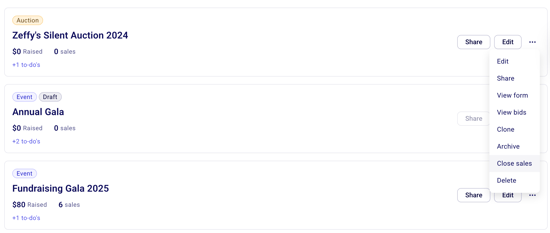
In your Zeffy dashboard, go to "Fundraising" then "Campaigns"
Click on the three dots next to your auction form
Select "Close sales"
When sales are closed:
Supporters can still view your auction items and form
No bids can be placed until you reopen sales
You can share your auction form link to give supporters a preview
Opening Your Auction for Bidding
When you're ready to begin accepting bids:
Go to "Fundraising" then "Campaigns"
Click on the three dots next to your auction form
Select "Open sales"
Important Notes
You must set an end date and time, and you can optionally schedule when bidding opens. If a bid is placed within the last 3 minutes of an item's close time, the close time for that item is automatically extended by 3 minutes, up to a maximum of 30 minutes total.
When the end date is reached, the auction automatically closes and winning bids are processed
Make sure to communicate your intended start time clearly to your supporters