
Tracking bids, payments, and item winners on your auction form
When your supporters place a bid on your auction form, they are asked to enter (1) the amount of their bid, (2) their contact details and (3) the payment method they will be charged if they win the auction.
Access your bids and bidders list
At any time during or after the auction, you can track their bids in your dashboard. Bids and bidders will appear on the “Payments” page of your auction tab. To view your bidders:
Go to Fundraising > Campaigns in your account and click on “Manage event” next to your auction form. Then click on “Bids” to access your payments and bids page.
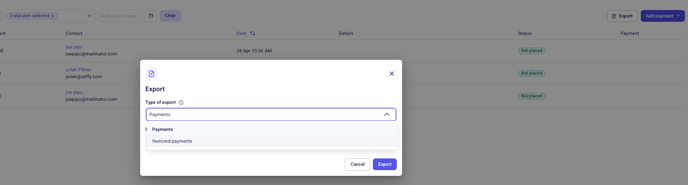
To obtain a report on bids, including the items on which your participants have placed a bet, you need to export a report.
To do this, click on “Export” in the top right-hand corner and, under “Export type”, select “Itemized payments”. You will then be able to see the items on which bidders have placed bids directly in the exported file.
View your auction winners
When your auction is over, the winning bids are automatically processed for payment. The corresponding transactions will appear as new payments in the “Payments” table of your dashboard.
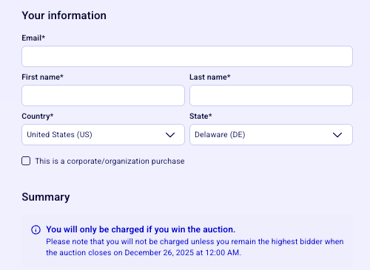
Bidders are informed that they will only be charged at the end of the auction if they are the winning bidder during the payment process:
To view winners and payments:
Go to Payments in the menu bar on the left of your dashboard.
Click on the "form completed” filter at the top and select your auction form from the drop-down menu.
Winners will be listed in the “Payments table” once their payments have been processed.
You'll be able to see the bidder's contact details, the final price they paid and the item they won.
You can also download the list of payments by clicking on “export” in the top right-hand corner of the page. Be sure to change the report type to Itemized payments before exporting.