
How auto-bidding works in Zeffy auctions
Auto-bidding is a bidder-facing feature on your Zeffy auction that lets participants set a maximum amount they are willing to pay for an item. The system then automatically bids on their behalf up to that limit, using only the minimum bid increment needed each time they are outbid. No additional setup is required on your auction form.
What your bidders see
On each auction item page, bidders can choose between Single bid and Auto-bid. When they select auto-bid, they enter only one value: the highest amount they are willing to pay. Zeffy places the lowest valid bid for them immediately, which is either the item's starting price or the current highest bid plus the minimum increment.
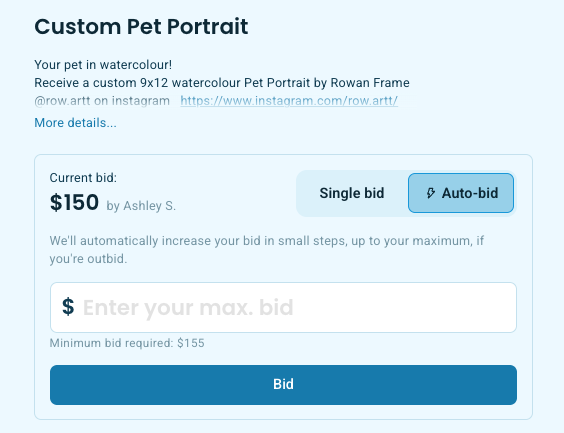
Your bidders do not need to re-enter payment information for subsequent auto-bids. The payment method saved with their first bid is used for all automatic bids on that item, and if they win, it is charged automatically when the auction closes.
How automatic bids are handled
When another bidder places a bid that would outbid an auto-bidder, Zeffy automatically submits a new bid on the auto-bidder's behalf at the minimum required increment. This continues until the bid amount would exceed their maximum.
If multiple bidders have auto-bids on the same item, the system resolves all counter-bids in sequence until only the highest eligible bidder remains. Every bid is recorded, including intermediate automatic bids, so your bid history shows the full progression. Bids placed by the auto-bid system are marked differently from manual bids in the admin view so you can distinguish them.
Tie-breaker when two bidders set the same maximum
If two bidders set the same maximum auto-bid amount, the bidder who set their auto-bid first wins. Their bid is placed at that maximum amount, and the later bidder is notified that they have been outbid.
Outbid notifications
Bidders receive an outbid email only when another bidder exceeds their maximum auto-bid amount. They do not receive an email for every intermediate automatic bid while the auction remains below their limit. If a bidder is outbid, the email includes a private link they can use to return to the item and place a new bid or raise their maximum.
Payment and auction closing
The existing payment and closing flow handles auto-bids exactly like manual bids. When your auction closes, the CloseAuctions process selects the highest bid per item as the winner, and the AuctionsPaymentProcessor charges that bidder's saved payment method. The payment processor does not distinguish between a winning manual bid and a winning auto-bid.
Auto-bids cannot be cancelled from the bidder page after they are set. A bidder's placed bids remain active even if they stop using auto-bid, and if they are the current highest bidder, that bid stands.
For help tracking bids and identifying winners, see Tracking bids, payments, and item winners on your auction form.