
Create and manage a members-only ticket
Zeffy allows you to sell tickets that are only available for active members. This guide walks you through setting up a members-only ticket inside an event campaign so that only eligible, logged-in members can purchase it. Each active membership can only be used to purchase one ticket order per campaign.
Before you start
You need at least one active membership campaign in your Zeffy account before you can create members-only tickets. If you have not set up memberships yet, create a membership campaign first.
Enable members-only access on a ticket
Navigate to the event campaign where the ticket will be configured and click Edit to open the campaign editor.
In the left-hand menu, select Tickets to view the ticket list.
Find the ticket you want to restrict and click More Options on it.
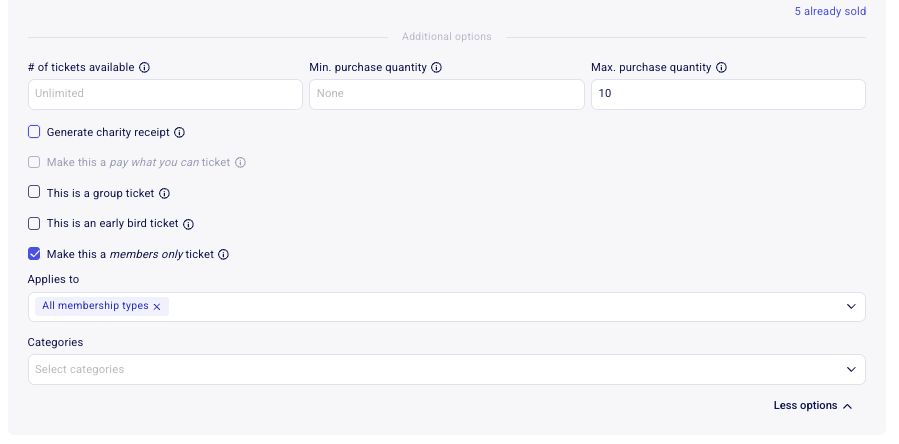
Choose Make This a Members-Only Ticket.
In the Applies To field, select the membership type(s) that should qualify. Available options include membership rates from any membership campaign in your Zeffy account. Leave the default All selection if the ticket should apply to every membership type.
Click Save and Exit to finalize the setup. Confirm the ticket appears as members-only in the campaign.
What do your buyers see?
How the ticket appears to a donor depends on whether they are logged in and whether they have an active eligible membership. Members-only tickets are limited to one order per membership per campaign.
Logged in with a valid membership
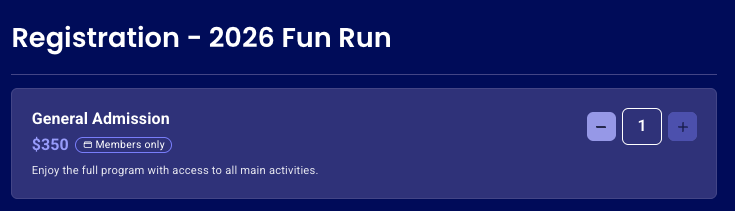
The donor can complete the purchase normally. Each active membership can only be used once per campaign, so a member who has already purchased this members-only ticket cannot buy it again with the same membership.
Logged in without an eligible membership
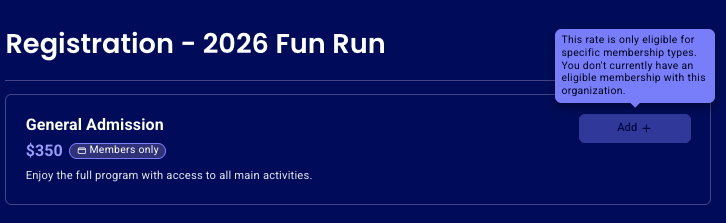
The ticket will not be available to purchase. The donor sees a message stating the rate is only eligible for specific membership types and that they do not currently have an eligible membership with the organization.
Not logged in
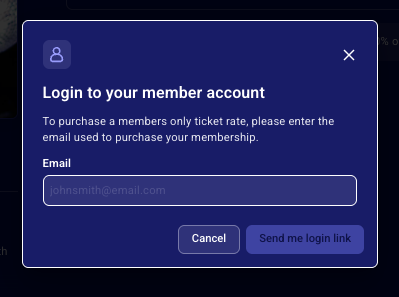
When a donor who is not logged in selects the members-only ticket, they are prompted to enter the email address associated with their membership. Zeffy sends a pre-authenticated secure link to that email address. Clicking the link signs them in automatically and returns them to the campaign page—no password or additional login step is required. Only donors with a valid membership can proceed to purchase the ticket.
Entering an email without an associated membership
If the entered email address is not associated with any active membership, Zeffy sends an email that does not contain a secure login link. Instead, the email informs the donor that there is no valid membership associated with that email address. It also includes a button to continue supporting the campaign, but this link does not authenticate them or allow them to purchase members-only tickets.
Donors without an eligible membership will be blocked from purchasing the ticket, even if they can see the campaign page. Verify the correct membership campaign and rate is selected in the Applies To field before saving.
Troubleshooting buyer access issues
Below are the common scenarios that prevent a donor from purchasing a members-only ticket and how to resolve each one.
The donor is not logged in
Ask the donor to enter the email address tied to their membership on the campaign page. They will receive a pre-authenticated secure link by email. Clicking it signs them in automatically and returns them to the campaign page—no password is required. If they do not see the email, have them check their spam folder and confirm they are using the exact email address from their membership record.
The email address has no associated membership
The donor receives an email stating there is no valid membership associated with that address. Confirm the donor is using the same email they used when signing up for the membership. If they used a different email, they need to enter the correct one or contact the organization to update their membership record.
The donor is logged in but has no eligible membership
The donor sees a message that the ticket is only eligible for specific membership types and that they do not currently have an eligible membership. Check the Applies To field on the ticket to ensure the donor's membership type is included. Also verify their membership is still active and has not expired.
The donor has already purchased with this membership
Members-only tickets are limited to one order per membership per campaign. If the donor already purchased this ticket using the same membership, they will see the error:
You have already purchased this member-only rate. Each member can only purchase it once.
They will need to use a different eligible membership or purchase a different ticket type.