
Why does the Check-in Manager say "N/A"?
What does "N/A" mean?
"N/A" appears when a name wasn't provided for that specific ticket during purchase
By default, only the buyer's name is captured when multiple tickets are purchased
Additional tickets under the same purchase will show as "N/A" if guest names weren't collected at the time of purchase
Can I still check in tickets marked as "N/A"?
Yes! You can check in these tickets normally by either:
Clicking the checkbox next to each ticket
Scanning the QR code on their e-ticket
The "N/A" status does not affect the ticket's validity or check-in ability
How to avoid "N/A" in future events
If you want to see individual names for all tickets:
Edit your event form before launching ticket sales
Go to "Questions per guest" in the form editor
Add a new question, and select "Name" as the "Response format". Careful! You must use the "Name" response format, otherwise it will not remove the N/A wording.
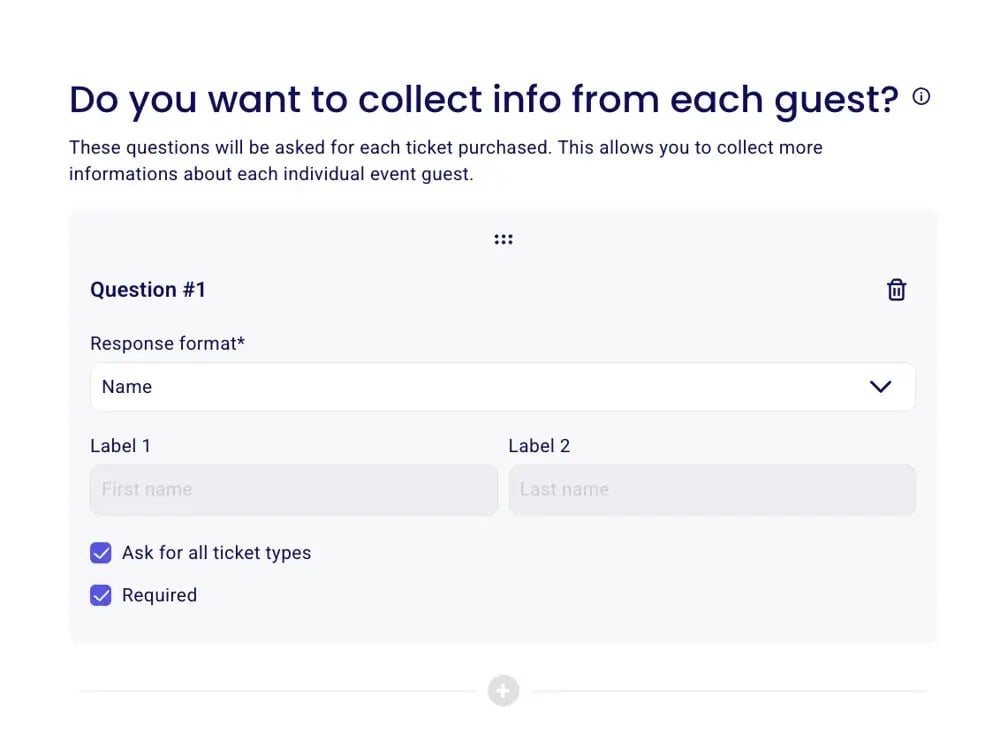
This will require each guest's name during checkout
Important Notes:
Multiple tickets purchased together will appear under the buyer's name
You can check in individual tickets within a multiple ticket purchase
Check-in status is tracked regardless of whether the ticket shows "N/A" or a name