
Set up monthly recurring donations
Zeffy fully supports monthly donations. Recurring giving is one of the simplest and most effective ways to provide ongoing support to a nonprofit. Whether you’re a donor wanting to give regularly or an organization looking to build a dependable funding stream, Zeffy makes monthly donations easy, automated, and completely free.
How monthly donations work on Zeffy
Monthly donations are set up directly through your nonprofit’s donation form. Here’s what happens:
Donors select the monthly giving option on the form.
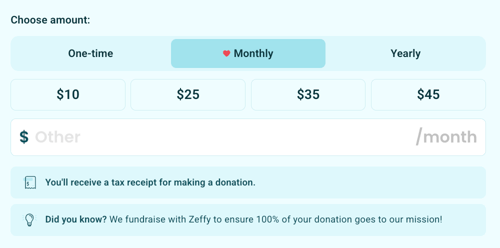
They enter their donation amount, payment details, plus their name and email.
The first payment is processed immediately, and that same day of the month becomes the initial recurring charge date.
The first payment sets the initial recurring charge date. Donors or your organization can later change that date for recurring donations (monthly, quarterly, or yearly). Membership renewal dates cannot be edited this way — they follow the expiration date set by your organization.
What happens each month?
On the charge date each month, Zeffy automatically processes the next donation.
Donors receive a confirmation email and receipt every time a payment is processed successfully.
Nonprofits see each donation as a new transaction in their Zeffy dashboard, just like a one-time gift.
Weekly and bi-weekly donations
Zeffy also supports weekly and bi-weekly donations. Turn on Weekly or Bi-weekly in the suggested donation amounts settings of your donation campaign to offer them on your form.
The first payment sets the recurring charge day. A weekly donation is charged on the same weekday every week: a donation started on a Monday is charged every Monday. A bi-weekly donation is charged every second week on that same weekday.
Weekly and bi-weekly donations work like any other recurring donation: donors or your organization can update the amount, change the payment method, or cancel the donation at any time, using the same steps as for monthly donations.
Can donations be modified or canceled?
Yes. Donors can manage their recurring donations (weekly, bi-weekly, monthly, quarterly, or yearly) anytime through their donor portal to:
Update the donation amount
Edit the charge date
Cancel the donation
Update their payment method
Learn how donors can manage recurring donations →
You can also update or cancel recurring donations on a donor’s behalf upon request.
What if a payment fails?
If a payment can’t be processed (for example, expired card or insufficient funds):
A failed payment attempt is marked as past due in your dashboard. Both you and the donor are notified of the failed payment and the past due status.

Our secure payment processor, Stripe, automatically retries the charge 4–5 times over several days.
After each failed attempt, donors receive an email notification with a link to update their payment information.
If the payment still doesn’t succeed after 5 retries, Stripe cancels the recurring charge. The monthly donation status updates to stopped.
If the donor wishes to continue giving monthly, they need to start a new monthly donation.
Tax receipts for monthly donations
If your organization offers tax receipts on Zeffy:
A single tax receipt for all monthly donations is generated and sent to donors at the end of the calendar year (in January of the following year).
This consolidated receipt summarizes the total amount donated throughout the year, making tax filing easier and keeping donation records well organized.
Learn more about tax receipts →
Migrating existing monthly donors to Zeffy
If you’re switching to Zeffy from another fundraising platform, you can import your donor information to keep your records up to date. However, active recurring donations cannot be transferred automatically.
This means you will need to:
Cancel existing monthly donations on your previous platform.
Invite your supporters to set up their monthly donations again using your new Zeffy form.
Learn how to import monthly donors →
Is it possible to select or change the billing date of a monthly donation?
Yes. When a donor starts a monthly donation on your Zeffy form, that first payment date becomes the initial charge date. After that, the charge date can be edited for recurring donations (monthly, quarterly, and yearly).
Donors can change the charge date from their Zeffy donor account (see how here), or your organization can do it from the Zeffy dashboard (see how here).
This is not available for memberships. Membership renewal dates are determined by the expiration date set by your organization.
To learn how to set up a form with a monthly donation option, click here.