
Move a donation to another form
To move a donation:
Go to Payments in your Zeffy dashboard.
Find the donation by the donor and click on the transaction. A page will open up towards the right.
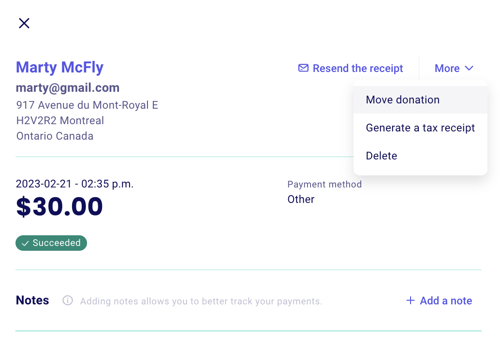
Click "Actions" at the top right of the transaction page, then click "Move donation."
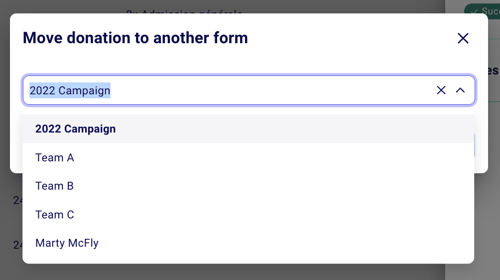
Select the team or campaign that you would like the donation moved to.
And you're all set! The donation will now be counted in the thermometer and show up under the page it was moved to. If you're checking the fundraising page, be sure to refresh the page just in case to see the adjustment.
When moving a monthly donation, every donation that came before the time you move it will be moved. It is not possible to only move an amount from a monthly donation after a certain date.
Donations can only be moved between donation forms. It is not possible to move a donation or a purchase to a ticketing form (event, raffle, online store, etc.). It is also not possible to move a donation in-between two different Zeffy accounts.
Keep recurring donations running when you close a campaign
Closing a donation campaign also stops the active recurring donations on it. Moving a recurring donation does not interrupt it: future payments keep coming in on the campaign you move it to.
To close a campaign and keep its monthly donors:
Move each active recurring donation to another donation campaign (for example, your general donation campaign), using the steps above.
Once all recurring donations are moved, close the original campaign.