
Set a custom starting number for your raffle tickets, entries, or event tickets
Tickets and entries on Zeffy are numbered starting at 1. For raffles and sweepstakes, you can choose a different first number yourself in the campaign editor. For events, memberships, and online stores, send us a request and we set it up for you.
Raffles and sweepstakes: set the first number yourself
A higher first number is handy when you also sell paper tickets, or when you want this campaign to continue the numbering of a previous one. You can change it until the first ticket is sold or the first entry is received.
Go to Campaigns.
Click Edit on your raffle or sweepstakes.
Open the e-Ticket section. For a sweepstakes, open Entry confirmation.
Make sure Issue e-tickets (sweepstakes: Send entry confirmations) is turned on. The number field only shows when it is.
In First ticket number (sweepstakes: First entry number), enter the number your first ticket or entry should get, for example 801.
Click Save & exit.
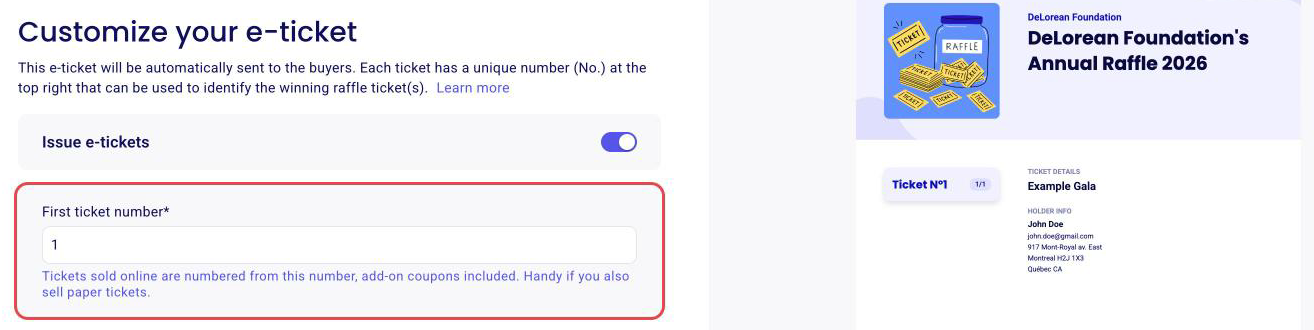
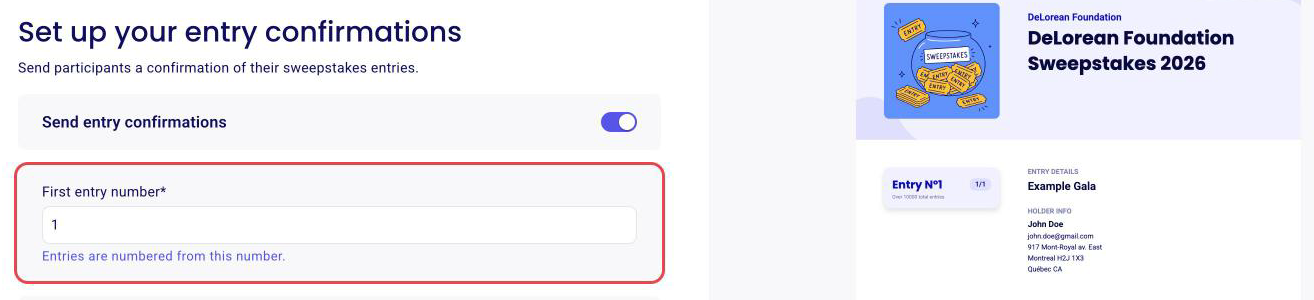
Numbers then go up by one for each ticket or entry, add-on coupons included. With a first number of 801, a first buyer who orders 3 tickets gets numbers 801, 802, and 803.
The field locks as soon as the first ticket is sold or the first entry is received. Once you've sold your first ticket, it will no longer be possible to update the number.
The first number must be a whole number from 1 to 2,000,000,000. It can't be 0, and it can only contain digits: no letters, symbols, dashes, or leading zeros.
Events, memberships, and online stores: ask us
Choosing the first ticket number yourself isn't available yet for these campaigns. If you'd like your tickets to start at a specific number, fill out this form and we set it up for you.
💡 We will need
1. The link to your Zeffy form.
2. The number you want your tickets to start at.
The same rules apply: a whole number from 1 to 2,000,000,000, digits only.
What you can and can't request
These are the questions we get most often about ticket numbering.
A first number, not a range. We set where numbering starts. Where it ends depends on how many tickets you sell: to stop at a specific number, set a ticket limit as described in How can I limit my sales or set a maximum number of sales? For example, to sell tickets 101 to 500, set the first number to 101 and the ticket limit to 400.
One sequence per campaign. Every ticket on a campaign shares the same numbering, so we can't number tickets separately by ticket type, by table, or by sales channel. Online sales and manual entries also share the sequence. To number by ticket type in the future, vote for this feature request: you'll get an email when it ships.
Tickets already issued keep their numbers. A new first number applies to the next ticket sold. To give an existing buyer a different number, cancel the ticket and issue a new one.
Paper and online tickets together. Keep a range for your paper tickets (for example 1 to 1000) and start online numbering right after it (1001). The full setup is in How to manage a raffle with online and paper/in-person ticket sales.