
Create a raffle with more than one prize/ basket
You can set up your raffle form to draw winners for more than one prize or basket. How you configure your tickets depends on how you want entries to relate to your prizes:
Equal chances for everyone: sell one entry ticket, showcase all the prizes, and draw every prize from the same tickets.
Buyers choose their prize or basket: create one ticket type per prize so people enter the draw for their preferred item.
General tickets, buyers pick a prize: sell general tickets (single entry, bundles, etc.) and ask buyers which prize they'd like their name drawn for with a custom question.
In a sweepstakes, no per-prize setup is needed: every entry gives the participant a chance at all of the prizes.
To get a step by step processing of setting up a raffle on Zeffy, please view how to set up and customize a raffle.
How entries relate to prizes
Sweepstakes: every entry gives the participant a chance at all of the prizes.
Standard Raffle: if you want every ticket to have an equal chance of winning all of the prizes, sell a single entry ticket and draw every prize from the same tickets. For baskets that people raffle on specifically, use ticket types to differentiate the prizes: create one ticket type per basket, as described below.
To showcase your prizes on the front page of your campaign, add them in the Highlight your prizes step of the form editor, between your draw dates and your description. See How to Create and Host a Raffle on Zeffy or How to Create and Host a Sweepstakes on Zeffy.
Option 1: Create a ticket type for each prize
Use this option when buyers should purchase a ticket for the specific prize or basket they want to enter the draw for. Each ticket type covers one prize, and you draw each prize's winner from its own ticket type.
Go to the Campaigns tab of your account.
If your form has not been created yet, click New campaign, select Raffle / Sweepstakes, and choose Standard Raffle on the Pick your lottery type screen. If your form has already been created, click Edit to the right of your existing raffle.
In the form editor, go to the Tickets section.
One ticket type is listed already. Just below it, click Add another ticket rate to create a new ticket type.
Add one ticket type per prize, with a description of each prize to be drawn. You can add as many ticket types as you'd like.
If you would like to add images of the items being drawn, use a "Custom sales" form. This form type will also generate e-tickets automatically and assign numbers for the draw, but it allows you to add an image next to the ticket name.
Option 2: Sell general tickets and ask which prize buyers want
Use this option when buyers should purchase general tickets and then indicate which prize they'd like their name drawn for.
Go to the Campaigns tab of your account.
If your form has not been created yet, click New campaign, select Raffle / Sweepstakes, and choose Standard Raffle on the Pick your lottery type screen. If your form has already been created, click Edit to the right of your existing raffle.
In the form editor, go to the Tickets section.
One ticket type is listed already. Just below it, click Add another ticket rate to create the various ticket types you want to have listed. Some ideas include:
Scroll down to the Per ticket sold section and add a per ticket question. Select Multiple choice with a single answer choice and in the answer propositions, enter the different prizes to be drawn. For every ticket the buyer selects, they will indicate which prize they want to be drawn for.
If your ticket bundle includes 5 tickets, they will be asked this question 5 times.
Equal chances for all prizes: one entry ticket
If you want every ticket to have an equal chance of winning every prize, you don't need extra ticket types or questions. Sell your single entry ticket, showcase the prizes in the Highlight your prizes step, and draw each prize from the same pool of sold tickets.
How to determine the winner of each prize
Zeffy does not have a raffle winner drawing tool. You must use an external tool such as a random name or number generator to pick your winner. To know which names and ticket numbers to enter in the draw, you must export your sales report.
If all of your prizes are drawn from the same tickets (a single entry ticket, or a sweepstakes where every entry applies to all prizes), run each draw on the full exported list. If you separated prizes with ticket types or a custom question, filter the list per prize as described below.
To get a full report of your sales that will include: Buyer names, ticket numbers and answers to custom questions, follow these steps:
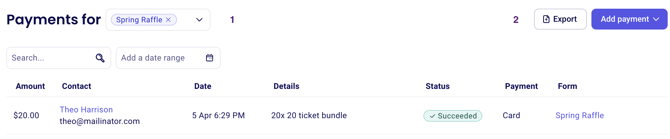
Go to Payments.
Filter by "form name", select your raffle form and apply the filter.
Click Export in the top right hand corner of your screen. Make sure to select the export type itemized payments to obtain the answers to custom questions in your account.
If you created a ticket type for each prize drawn
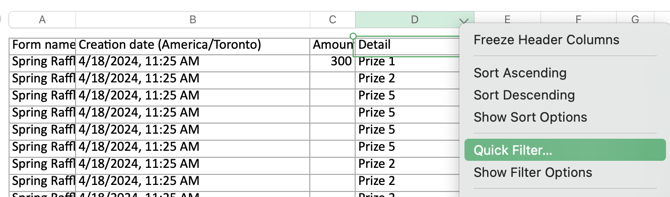
You can use quick filters on the downloaded spreadsheet to filter the "Detail" column. Unselect all the names of tickets associated to prizes you are not drawing for to view the buyers and ticket numbers associated to the ticket type associated to each prize. In the example below, we want to draw a winner for "Prize 1," so we unselect "Prize 2," "Prize 3" and "Prize 4" in the filter:
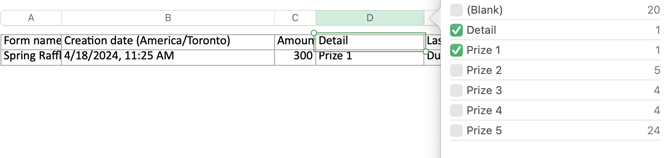
You can then pick your winner from the filtered list for that prize.
Filter for each prize in the same way until you have drawn a winner for each.
If you added a custom question per ticket
When you add a custom question per ticket, the answers will be found on the exported sales report. You can use quick filters on the downloaded spreadsheet to filter the column named with your custom question. Unselect all the answer choices associated to prizes you are not drawing for to view the buyers and ticket numbers associated to the prize selected in the drop down. In the example below, we want to draw a winner for "Prize 1," so we unselect "Prize 2," "Prize 3" and "Prize 4" in the filter:
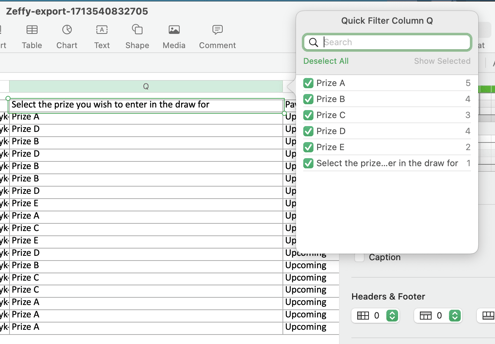
You can then pick your winner from the filtered list for that prize.
Filter for each prize in the same way until you have drawn a winner for each.