
Embed your peer-to-peer campaign, thermometer or leaderboard
For peer-to-peer campaigns, you can embed the full campaign form, just the thermometer, or just the leaderboard on your website. These options are available only for peer-to-peer campaigns and let visitors interact with your campaign directly from your site without leaving the page.
When you embed a P2P campaign, Zeffy generates an HTML code snippet that you paste into your website builder's custom HTML or embed block.
Step 1: Retrieve your P2P campaign's HTML embed code from Zeffy
You can get the embed code for any open peer-to-peer campaign from your Zeffy dashboard.
Log in to your Zeffy account.
Navigate to Campaigns.
Find the peer-to-peer campaign you would like to share.
Click the three dots (⋯) to the right of the campaign.
Select Share.
In the sharing pop-up, click More ways to share and then select the Embed option.
Under Embeds, choose your preferred option:
Campaign - embed the full peer-to-peer campaign form.
Thermometer - embed only the thermometer section showing your campaign's progress.
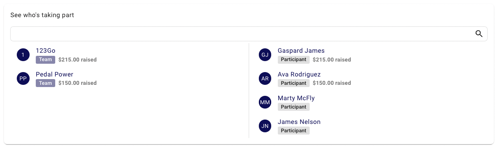
Leaderboard - embed only the leaderboard section showing teams and participants.
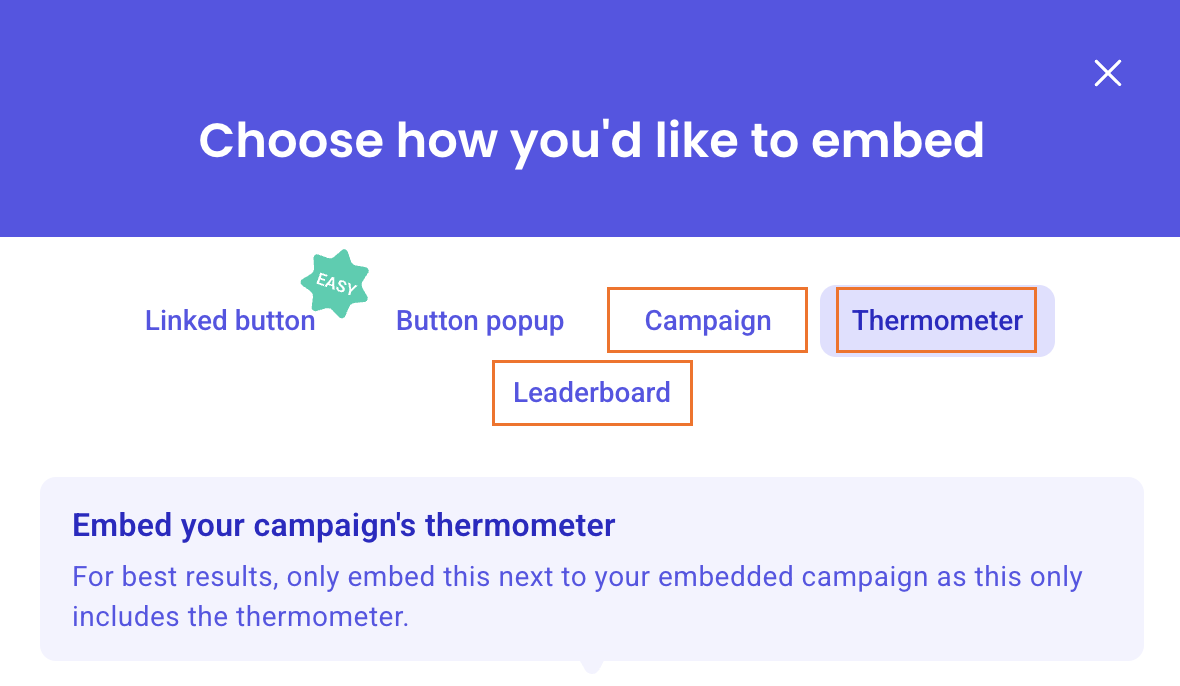
Copy the generated HTML embed code. You'll use this code in the next steps to add it to your website.
Step 2: Add the code to your website
Paste the copied HTML code into your website builder's Custom HTML, Embed Code, or Embed block.
Once added, the corresponding Zeffy element (campaign, leaderboard, thermometer, button, etc.) will automatically appear in that location on your page.
Embedding your thermometer - Embedding your thermometer will allow you to only embed the "thermometer" section of your form on your website. This is a great way to share your campaign's progress without needing to embed the whole form.

Embedding your leaderboard - Embedding your leaderboard will allow you to only embed the "leaderboard" section of your form on your website. This is a great way to show a list of teams and participants without needing to embed the whole form.
Here are some useful tutorials from popular website providers:
Don't see your website provider listed above?
Most website builders support embedding custom HTML code using a Code Block, HTML Block, Embed Element, or similar feature. In that case:
Consult your website provider's documentation for adding custom HTML or embed code to a page.
Add the appropriate HTML, Embed, or Code element to your page.
Paste the Zeffy embed code into that element.
Save and publish your website