
Why is buyer information not being requested at checkout?
Express checkout is available to donors and buyers with Apple pay or Google pay enabled on their device.
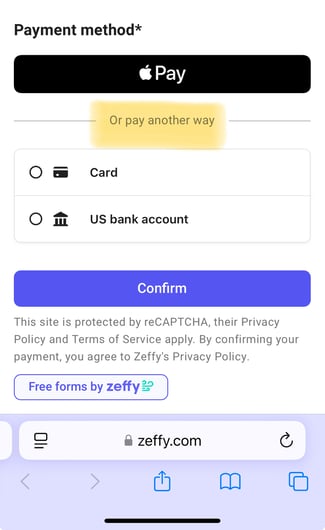
If you are not seeing a section to input contact details such as first name, last name, email and address before proceeding to payment, it is because you have Apple pay or Google pay enabled on your browser.
When paying with Apple pay or Google pay, express checkout is enabled. That means the contact details recorded at the time of payment are being pulled from the Apple or Google pay app. The donor or buyer will therefore only need to answer any additional questions being asked on the form before proceeding to payment.
If you scroll to the payment module of the page, you can change the payment method from Apple/ Google pay to credit card or ACH/PAD. When you select either payment method, you will be asked to enter your contact details (name, email, address)
Wrong name or email on an Apple Pay payment
When someone pays with Apple Pay, we receive the name and email saved in their Apple Wallet. If that information is outdated or has a typo, the payment and the confirmation email use it, and it is reused for every future Apple Pay purchase.
Buyers and donors: update your email and contact details in your Apple Wallet or Apple Pay settings so your next purchases are correct.
Organizations: find the payment in Payments using the card's last 4 digits and the amount, then correct the details and resend the confirmation as explained in Update or correct donor information after a payment.