
Update or correct donor information after a payment
Once a payment is recorded in Zeffy, most fields on the payment itself cannot be edited. This ensures the integrity of your financial records. However, you can correct donor information for future communications and resend receipts to the right email address.
What can and cannot be changed
Payment records themselves cannot be edited — the amount, payment method, email, and name associated with the transaction are locked once recorded in Stripe.
The address field can be edited — this is the only field on the payment record that can be modified.
Contact information can be updated — you can correct a donor's email or name in their contact profile, which ensures future communications go to the right place.
Correct a donor's email address
If a donor made a typo in their email, you can resend their receipt to the correct address and update their contact for future communications.
Step 1: Resend the receipt to the correct email
Go to Payments.
Search for the transaction by the donor's name or incorrect email.
Click on the transaction to open the details drawer.
Click More in the top right corner.
Select Resend the receipt.
Enter the correct email address and send.
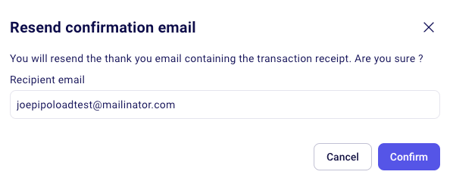
Step 2: Update the contact for future communications
Go to Contacts.
Search for the donor's contact by name.
Click to open their contact profile.
Update the email address and save.
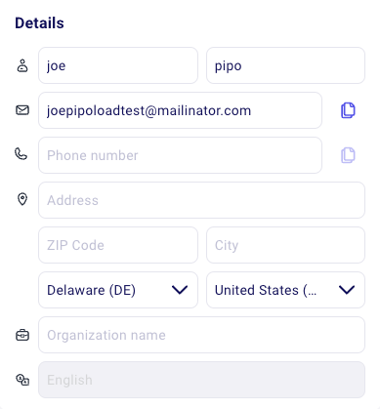
Reminder emails: If you have reminder emails configured, they will continue to be sent to the original (incorrect) email address until you update the contact.
Correct a donor's name
If a donor's name was entered incorrectly, you can update it in their contact profile:
Go to Contacts.
Search for the donor's contact.
Click to open their profile.
Update the name field and save.
The name and email on the payment record itself cannot be changed, as these must remain consistent with what was recorded in Stripe. The contact profile update ensures future communications use the correct information.
Edit the address on a payment
The address field is the only part of a payment record that can be edited after the transaction is recorded:
Go to Payments.
Click on the transaction to open the details drawer.
Click Edit next to the address field.
Update the address and save.
You can also show the buyer's address directly in the payments table: click the three dots in the top right corner, select Manage columns, and check Buyer address. See Customize the columns in the payments table.