
Donor-advised fund (DAF) payments: Enabling DAF as a payment method
What is a donor-advised fund?
A donor-advised fund (DAF) is a charitable giving account: the donor contributes assets to the fund, takes the tax deduction immediately, and the DAF provider (the sponsoring charity) legally holds the money. The donor keeps the right to recommend grants, which is how they give to your organization through Zeffy. The DAF provider sends the grant to your organization directly, and there are no platform fees on DAF payments.
Enabling DAF payments on your campaign
DAF payments are available for US organizations with an EIN and full address on file. Turn the option on for each campaign where you want to offer it:
Go to the "Fundraising" tab, then go to "Campaigns".
Hover over the campaign name you wish to change and the edit button will appear to the far right. Click "Edit".
In the advanced settings, find the "Finance and accounting" section.
Turn on "Offer payment by donor-advised fund (DAF) over $1,000".
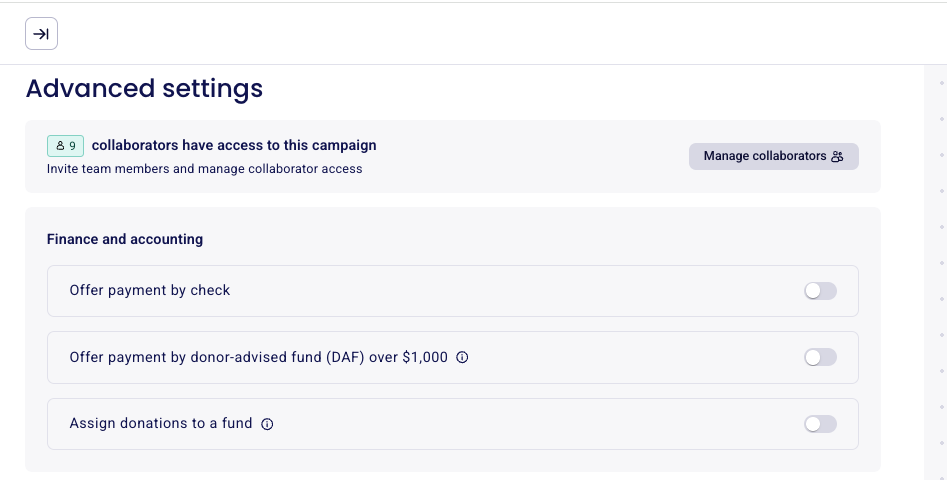
Fundraiser and team pages don't have their own toggle: they inherit the setting from the campaign.
How donors give through a DAF
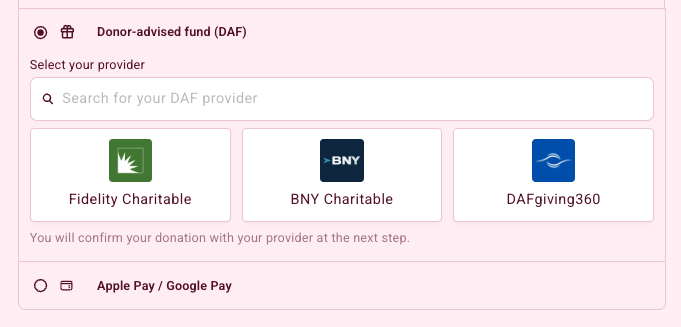
When DAF is enabled, donors see "Donor-advised fund (DAF)" as a payment option at checkout for donations over $1,000. Here is what happens when they choose it:
The donor selects "Donor-advised fund (DAF)" and searches for their provider. Providers include Fidelity Charitable, BNY Charitable and DAFgiving360.
The donor enters their contact information on your form.
Their DAF provider's portal opens in a new tab, where the donor signs in and submits the grant request for the donation.
Back on your form, the donor confirms they submitted the request by clicking "Yes, donation request sent", which takes them to the confirmation screen.
Managing DAF payments
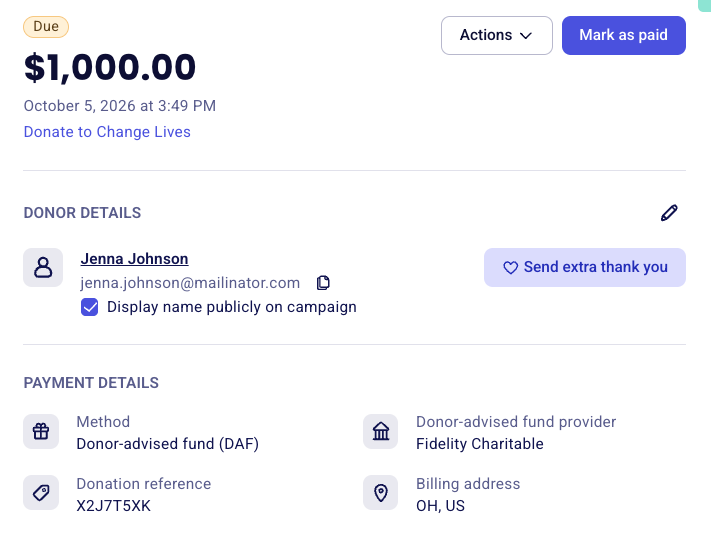
DAF donations appear in your payments list with the payment method "DAF" and the provider name, for example "via Fidelity Charitable". The payment details also show the donation reference from the provider.
The payment shows as "Due" until the grant arrives from the DAF provider. When you receive it, open the payment, click "Mark as paid", enter the payment date and click "Confirm payment". The payment status then changes to "Succeeded".
Zeffy does not generate automatic tax receipts for DAF payments. The donor already received a receipt from their DAF provider when they contributed to the fund.
Limitations
DAF payments are one-time donations only: recurring or scheduled DAF gifts are not supported.
DAF cannot be used for quid pro quo purchases such as event tickets, auctions, raffles, or memberships with perks.
For a comparison of every payment method your donors can use, see Supported Payment methods on Zeffy.