
How can I translate my campaign?
🇨🇦 Canadian nonprofits can translate their campaigns from English to French and from French to English.
🇺🇸 US nonprofits can translate their forms from English to Spanish.
🇩🇪 German nonprofits can translate their campaigns from English to German and from German to English.
To translate form:
Log into your Zeffy dashboard on your computer.
Go to "Campaigns"
Click "Edit" next to the name of the form you want to edit and go to the "Advanced Settings" section of the form.
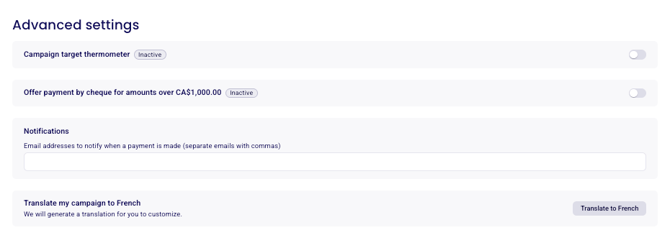
Click on "Translate to French/Spanish/German" at the bottom of the page depending on if you are in a Canadian, US account or German account. You should now have 2 sections of the form, one in English, and the other one blank in either French, Spanish or German.
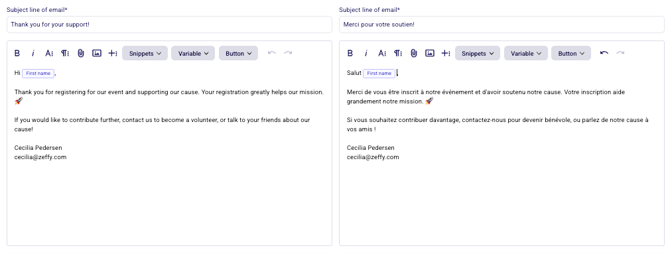
We auto-translate for you, so all you need to do is double check if everything is phrased the way you'd like it. You can edit the translated content in the form.
⚠️ Make sure that each section with contents on the English form is also translated. Otherwise, you will obtain an error message stating that you're missing translations.
Click "Save". Your form should now be translated! The language it appears in for your donors will depend on the donor's browser language preference.
However, you can also access a specific translation of your form. In the top right of your form, you will see a button to switch to the other language.
English <> French
To switch from the English to the French version of your form, click on FR in the top right of your form when viewing it through your share link.

English <> Spanish
To switch from the English to the Spanish version of your form, click on ES in the top right of your form when viewing it through your share link.

Other languages
Translation is only available for the language pairs listed above. It is not possible to translate your campaign into any other language.