Supported Payment methods on Zeffy
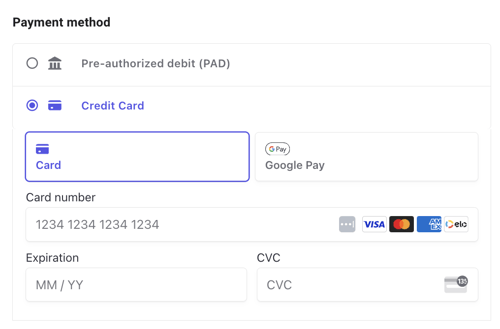
💳 Credit Cards or Debit Cards
We accept credit and debit cards for payments up to $5,000. Accepted credit cards include, but are not limited to, Visa, Master Card and American Express cards.
Users will be able to pay by entering their card number, expiration date and CVC.
🍎 Apple Pay / Google Pay
On most forms, Apple Pay and Google Pay appear automatically on mobile and desktop if your supporters' devices and browsers support them. No need to configure them in your form settings. Apple Pay and Google Pay are available for payments up to $5,000. They are not shown for larger amounts or for yearly recurring donations.
On embedded forms, only Google Pay is offered. Apple Pay is not available there, so supporters who want to pay with Apple Pay need to open your campaign directly through its Zeffy link.
Auction forms: Apple Pay and Google Pay are available on auction forms. Like a credit card, the payment is only authorized when a bidder bids, and it is charged only if they win the item.
🏦 Bank transfer payments or ACH / PAD
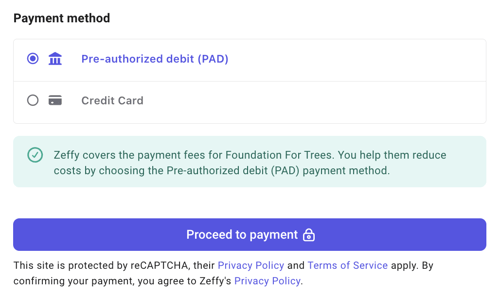
Donors can pay by direct bank transfer (ACH/PAD) for any amount up to $20,000 per payment. When they choose the ACH payment method, they won't immediately see a field to enter their information as they would for a credit card payment. Instead, they need to click on "proceed to payment" at the bottom of the page, at which point they will be asked to enter their banking information.
It's important to note that on event, raffle and other sales forms with an event date configured, ACH/PAD payments are not accepted 10 days before the event to avoid overselling due to the longer processing times associated with these transactions.
This 10-day cutoff is based on the event date set on your campaign, not on the ticket sales closing date. You can't turn bank transfer on or off manually for a campaign.
If you use an event campaign to collect a registration or entry fee that has its own payment deadline, bank transfer can stay open too late when the event date is after that deadline. Create a separate event campaign for the registration and set both its event date and its ticket sales closing date to your payment deadline, so bank transfer stops 10 days before it. Use another event campaign for the event itself.
💷 Cheque
If enabled in the advanced settings of your form editor, individuals can make payments by cheque for any amount up to $20,000. You set in the advanced settings the amount starting from which the cheque option appears, so your organization controls the minimum cheque amount it accepts. Please note that this option is available for one-time donations only, and it cannot be used for monthly donations.
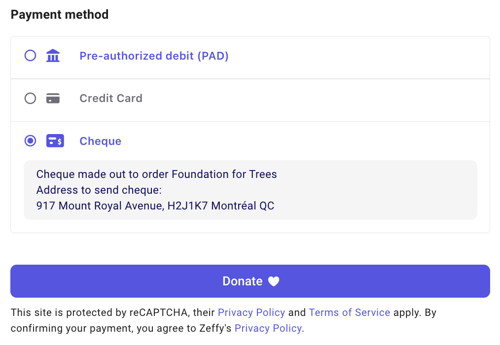
To turn this option on, go to Campaigns > Edit > Advanced settings and turn on "Offer payment by cheque". Cheque payments are not recorded as "Succeeded" right away: they stay pending ("Due") until you mark the cheque as received. The donor is responsible for sending the cheque to your organization so you can deposit it in your bank account.
Can I accept cheque payments under $1,000?
Yes. In the advanced settings of your form editor, you set the minimum amount at which the cheque option appears, so your organization decides the smallest cheque amount it accepts. Cheque payments can be used for any amount up to $20,000 per payment.
To accept cheque payments, go to Campaigns > Edit > Advanced settings and turn on "Offer payment by cheque".
🎁 Donor-advised fund (DAF)
Donor-advised fund payments are available for US organizations on donation campaigns and peer-to-peer campaigns. Donors give through their DAF provider (such as Fidelity Charitable, BNY Charitable or DAFgiving360), and the provider sends the grant directly to your organization. This option applies to one-time donations over $1,000 and must be enabled in the advanced settings of your form. See Donor-advised fund (DAF) payments: Enabling DAF as a payment method for how to enable and manage DAF payments.
Why don't all donors see the same payment methods?
We choose which payment methods to show automatically, based on the payment amount and the donor's device and browser, and the settings you choose for your form. You can't force a payment method (for example, cards for every amount) or hide one on a campaign.
Cards, Apple Pay and Google Pay are offered for payments up to $5,000.
Donors can pay by bank transfer (ACH/PAD) for any amount up to $20,000 per payment. On donation forms, the amount can't be more than $20,000.
Apple Pay and Google Pay appear only on devices and browsers that support them.
Cheque appears above the minimum amount you set in the advanced settings of your form, for payments up to $20,000.