
How to Sell Digital Products/Downloads
Overview
Zeffy allows you to sell digital products by attaching them to the automated thank you email that buyers receive after their purchase. This is a great way to deliver PDFs, digital downloads, and other electronic files to your customers immediately after payment. For physical goods that need pick-up or shipping, use Order fulfillment on an online store instead—see Set up shipping and pick-up for your online store.
Important Guidelines
Only one attachment can be included per thank you email
Maximum file size is 20MB per attachment. If your file is larger, consider adding a private link to your thank you email to a webpage where the digital document can be downloaded.
Each form can only have one version of the thank you email
Supported file formats: PDF, JPG, PNG, and JPEG
Best Practices for Digital Product Sales
1. Create Separate Forms for Each Product
Create individual online store forms for each digital product
This allows you to:
Attach the correct file to each form's thank you email
Customize the description and pricing for each product
Track sales separately for each digital item
2. Configure the Thank You Email
In your form editor, navigate to the "Thank you email" section to edit the email sent after purchase
Click the paperclip icon to attach your digital file
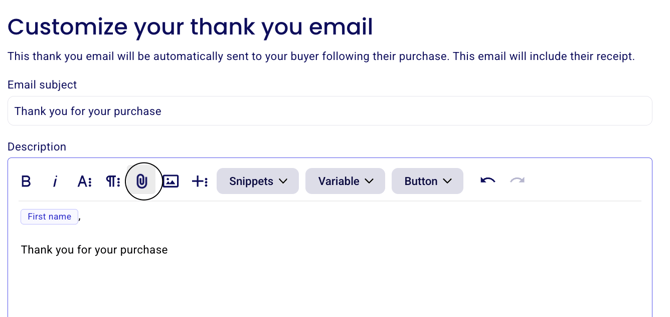
Ensure the file is properly uploaded before saving
Test the process by making a sample purchase (Instructions on how to test here)
Verify that:
The file opens correctly
The email delivers promptly
All instructions are clear and accurate
3. Managing Orders
Monitor your dashboard for successful purchases
Ask them to check their spam folder
Use the resend confirmation email feature if buyers don't receive their email (Instructions here)