
First check the Past tab: a campaign moves there once its date has passed. If it's not there, open the Deleted tab, which shows who deleted the campaign and when, often another user on your account. Restore it from there. If your email is linked to more than one organization, also check that you are in the right account: click your name at the bottom left, select Switch profile, and choose the organization.
How to restore a deleted campaign
You can restore a deleted campaign yourself for 30 days after it was deleted, from the Deleted tab of your Campaigns page. After 30 days, the campaign is removed for good.
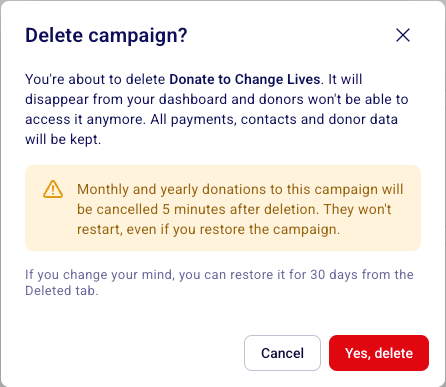
Deleting a campaign removes it from your dashboard and takes it offline for donors. All payments, contacts and donor data are kept. Monthly and yearly donations to the campaign are cancelled 5 minutes after deletion, and they don't restart if you restore the campaign.
Restore a deleted campaign
The Deleted tab only appears when your account has at least one campaign deleted in the last 30 days. If you don't see it, no campaign was deleted in that time.
Go to Campaigns.
Click the Deleted tab at the top of the page, next to Ongoing and Past.
Find your campaign. Each campaign shows the date it was deleted and the user who deleted it.
Click Restore to the right of the campaign.
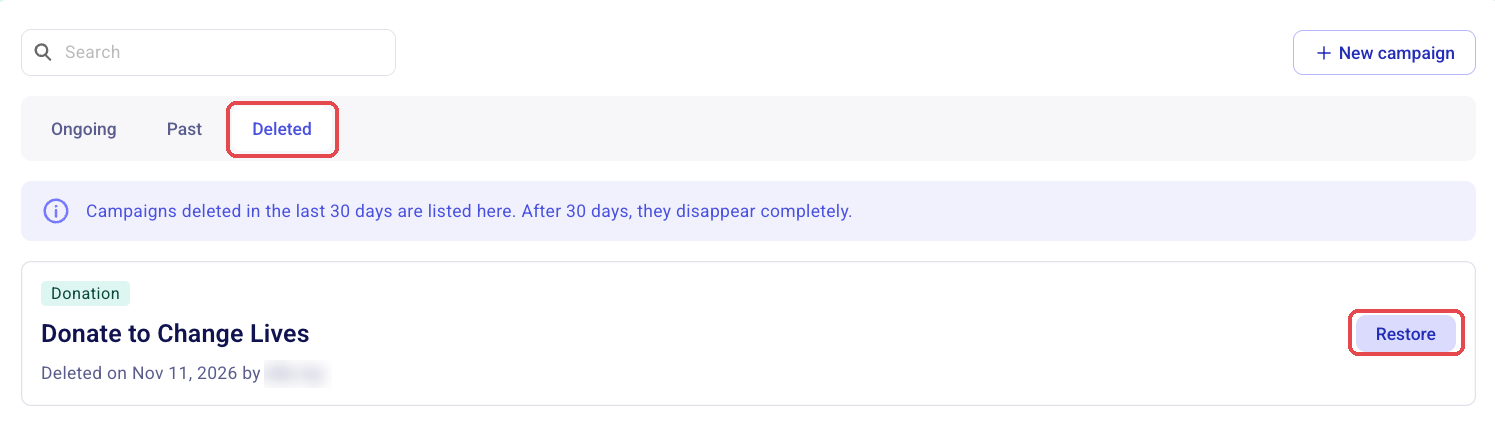
The campaign goes back to the Ongoing or Past tab, depending on its dates. For example, an event whose date has passed goes to Past. Its original link and QR code work again.
What restoring doesn't bring back
Restoring a campaign doesn't restart its monthly and yearly donations. They were cancelled when the campaign was deleted, so each recurring donor needs to start a new recurring donation.
Restoring a campaign also doesn't reopen sales that were closed before it was deleted. To accept payments again:
Go to Campaigns.
Click the three dots (⋯) next to the campaign.
Select Open sales.
Also check the sales closing date: click Edit on the campaign and open the Date section.
Campaigns deleted more than 30 days ago
After 30 days, a deleted campaign no longer appears in the Deleted tab and you can't restore it yourself. Its payments stay in Payments. If you need help with an older campaign, fill out this form with the exact name or the Zeffy link of the campaign.
What to do instead of deleting
If you want to stop receiving donations or close a campaign but do not want to permanently delete it, archive the campaign instead. Archiving keeps all your data and the form accessible, and you can unarchive it at any time.
To archive a campaign, go to Fundraising > Campaigns, click the three dots next to the campaign, and select End Campaign or Close Sales. To view or reopen an ended campaign, head to campaigns > click on the past tab at the top of the campaigns page.
Common questions
My campaign disappeared or its link stopped working
Are my payments and tickets lost when I delete a campaign?
No. Payments, contacts and donor data stay in your account after a deletion. You can still find them in Payments, whether or not you restore the campaign.
Several versions of the same campaign were deleted. Which one should I restore?
Restore each one from the Deleted tab, check which one is right, then delete the others again.
If I delete a cloned campaign or its original, is the other one deleted too?
No. A clone and its original are separate campaigns, and deleting one does not delete the other.
Was this helpful?
Was this helpful?