
How to allow people to RSVP on your Zeffy form?
Option 1: Create a free ticket form
This is the recommended method for tracking attendance, as it provides the most features and flexibility.
Create a new event form in your Zeffy dashboard
Set up your event details:
Enter your event name, description, and location
Add the event date and time
Set the sales close date (when you want to stop accepting RSVPs)
Create your free ticket:
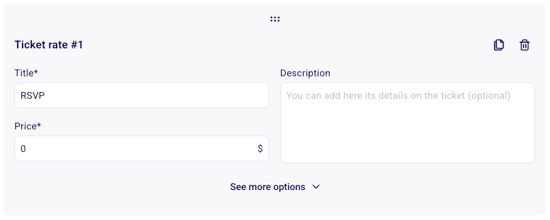
Click "Add ticket" in the Tickets section
Set the ticket price to $0
Add a description of what's included
Click the "See more options" button to set a maximum capacity if needed
Add custom questions to gather additional information:
Click "Add question" in the form questions section
Use "Buyer only" questions for information you need once per registration
Use "Per attendee" questions to collect information for each attendee when multiple tickets are purchased
Consider adding questions like:
Dietary restrictions
Workshop preferences
Special accommodations needed
Customize the confirmation:
Make sure e-ticket generation is enabled so attendees receive a confirmation
Edit the thank you email to include important event details (Edit the "Thank you" or confirmation email sent to donors)
Set up an automated reminder email to send before the event (Editing and scheduling a reminder email)
Option 2: Email tracking method
This alternative method uses Zeffy's email tracking capabilities:
Create an email list of potential attendees
Send a bulk email through Zeffy with (steps here):
Event details
A link to a confirmation page
Clear call-to-action to confirm attendance
Track responses through Zeffy's email analytics to see who clicked the confirmation link
Additional features to explore
Guest List Management: Access your RSVP list through the guest list view in your dashboard
Export Capabilities: Download attendance reports with all respondent details
Multiple Attendee Names: If someone is registering for multiple people, you can collect all attendee names (see how)
Automated Communication: Send reminders and updates to confirmed attendees
Check-in Tools: Use Zeffy's check-in features during the event to track actual attendance