
How to delete or deactivate a Zeffy account
To delete your organization's Zeffy account, please:
Log into your Zeffy dashboard on a computer.
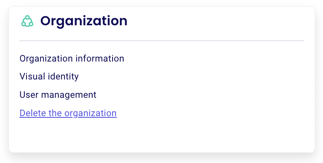
Click on your name in the bottom left corner and then on "Settings."
Under "Organization," you will see the option "Delete the organization.
➡️ Deleting an organization deletes only that organization, even if it is the only one in your account. Your Zeffy user (donor) account stays, and you can delete it separately afterwards.
➡️ If you have multiple organization profiles in your account, the organization in which you are will be deleted.
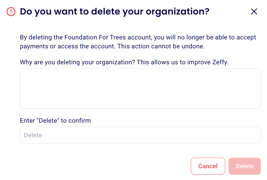
You will be asked why you no longer want to use Zeffy. This allows us to improve our platform based on your feedback. Enter "Delete" to confirm.
If you are in your donor account, you can delete it by following the instructions specific to deleting a donor accout. They can be accessed here.
.
If you received a payment that hasn't been paid out yet
Don't delete the organization while a recent payment is still waiting to be deposited to your bank account: deleting it could affect your access to those funds. Choose one of these options first:
Wait until the funds are deposited to your organization's bank account, then delete the organization.
Refund the payment to the payer (see Managing Refunds and Ticket Cancellations in Zeffy), then delete the organization.
Manage team access instead
If you want to manage permissions or remove a team member without deleting the organization, you can update user roles and remove users in Settings. See User Roles, Permissions, and Account Ownership Transfers for instructions.