
Activating your Zeffy donor account
After making a donation or purchase, you can activate your account from the link in your confirmation email, or directly from zeffy.com/login

To activate your account from zeffy.com/login:
Go to the login page and enter the email address you used when you made your donation or purchase
You'll receive an email with a link to create your password
Click the link in that email, set your password, and you're in.
Please note that if you have used multiple e-mails to make transactions on the platform, you will only see a portion of your transactions in this donor profile, as the transactions are associated with the e-mail address used at the time of payment.
💡 Don't see a confirmation email with your activation link? You can still head to zeffy.com/login and access the account from there.
⚠️ Getting redirected back to the login page? This usually happens when the activation link has expired or has already been used. Simply go back to zeffy.com/login, enter your email, and request a new link.
What you can do from your donor account
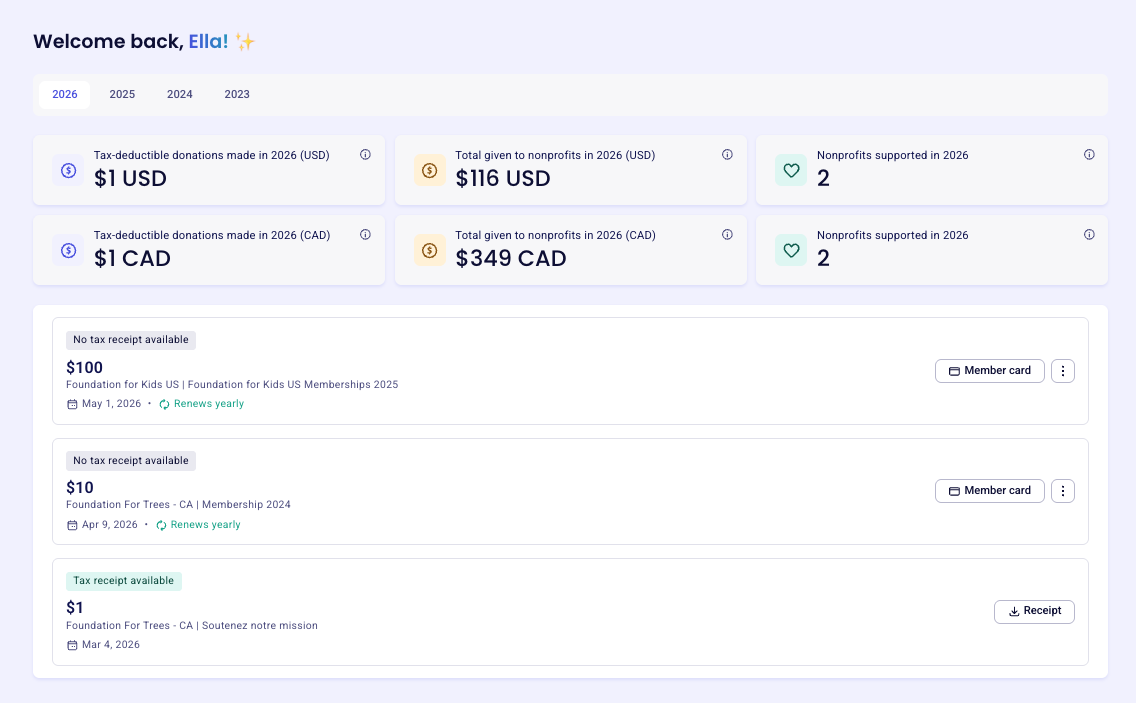
1️⃣ View your transaction history and manage your recurring donation or membership
All your transactions are listed under the My transactions tab. Click anywhere inside a payment's row to open a details panel on the right. From there, you can:
Download any documents linked to the payment (membership card, receipt, e-ticket)
Cancel your recurring payment, if applicable
Update your payment method, if applicable
Adjust your optional contribution to Zeffy
Edit your donation amount, if it's a monthly or yearly recurring donation
2️⃣ View or edit your peer-to-peer fundraising page
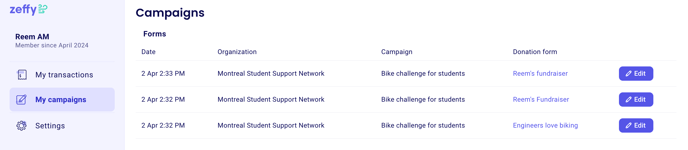
If you've joined a fundraising campaign as an individual or as part of a team, your donor dashboard lets you edit your personal fundraising page - update your description, change your goal, or share it with new supporters.
3️⃣ Change your contact details
In Settings → My account → Personal information, you can update your first name, last name, and email address.
Changing your email address acts as an account merge. For example, if you change your email from A to B:
Your login email becomes B (your password stays the same)
If an account already exists under B, the two accounts will be merged automatically
A confirmation email is sent to B — once confirmed, all transactions from both accounts will be accessible from one login
To merge multiple accounts (if you've donated from different email addresses and want to see everything in one place): log into the account you want to keep, then replace its email with the address of the other account. Follow the confirmation link sent to that address to complete the merge.
To update your mailing address, please contact the organization directly. This can't be changed from your donor profile.