
Business Registration & Directorship Verification (Canada)
The easiest way to complete both your business registration and board of directors verification in Canada is to submit a signed resolution. This template is approved by Stripe for verification purposes in Canada and is the fastest way to get your account verified.
One document, two requirements: This single resolution satisfies both your proof of business registration and directorship verification.
Download the Template
Download the signed resolution template and follow the steps below.
How to Complete the Resolution
Open the template from the link above
Create a copy to edit your own version (File → Make a copy)
Add your organization's information:
Organization name
Full address
Registration number (if applicable)
Names of all directors
This information needs to perfectly match the information added to your Zeffy account.
Save your completed resolution
Head to Zeffy
Go to the Finances tab in the left menu
Click "Update your information" in the yellow warning banner
Before you submit, verify that all the information in the Zeffy account matches what you've listed on your signed resolution
If you need to edit your non-profit name or address, click on "edit" to the right of the business details section in your verification.
If you need to edit your directors, you can remove / edit / add directors in the directors section of your verification
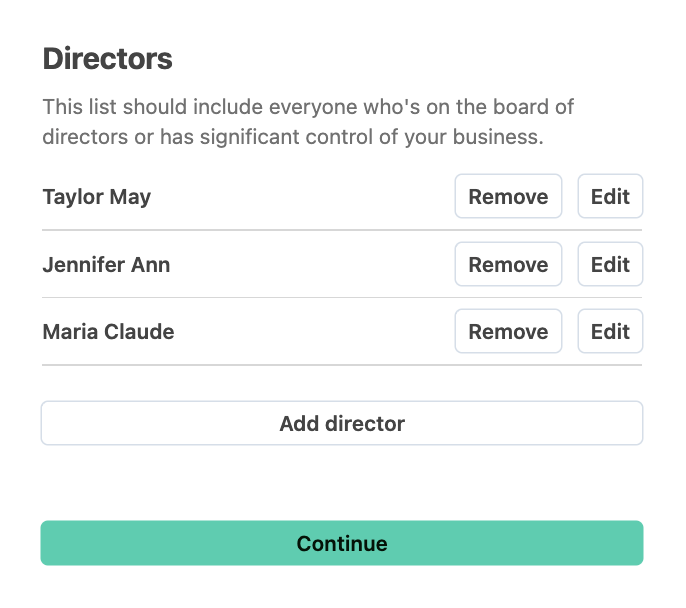
Then, locate the "Information required" section in the account to upload your resolution.
Important: Match Your Information Exactly
Organization name and address must match exactly what's entered in your Stripe profile
Director names must match exactly what you entered in Zeffy – use full names as they appear (e.g., "Jonathan Clyde Brown," not "John Brown" or "Jonathan C. Brown")
Do not include titles or positions next to director names
After Submitting
Your verification will be pending for 24-72 hours while Stripe reviews. Check back after this period to confirm the yellow warning banner has disappeared.
Troubleshooting
If your resolution is rejected:
Upload the file directly – scanned documents or photos are often rejected
Verify that director names on the document match exactly what's in Zeffy
Verify that organization name and address match exactly what's in your Stripe profile
Watch the video tutorial above for detailed guidance
Video Tutorial
Still Having Issues?
If you're unable to complete verification using the resolution template, see the full list of accepted documents in Complete Your Canadian Stripe Verification.