
Integrating Zeffy with other softwares
Zeffy connects to other tools in four ways: QuickBooks for direct accounting sync, Zapier or viaSocket for no-code automations, the Zeffy API and webhooks for custom integrations, and Claude or ChatGPT for asking questions about your fundraising data in plain language. For your website, Zeffy offers a WordPress plugin, campaign embeds, and tracking integrations like Google Analytics.
QuickBooks (direct integration)
Zeffy connects directly to QuickBooks Online from Finance > QuickBooks. The integration syncs future Zeffy payouts to QuickBooks as a deposit broken down by campaign or fund, and you can map each campaign to a QuickBooks account. The sync is one-way, from Zeffy to QuickBooks, and does not sync past payouts. See Connect Zeffy to Quickbooks Online.
Zapier and viaSocket (no-code automations)
Zapier connects Zeffy to web tools and databases with no code. When you receive a transaction or donation with Zeffy, you will be able to automatically:
Create a contact in your database
Create a contact in your newsletter tool
Send a Slack message to the person in charge of donations
And many other things!
Log in to your Zapier account (or sign up), and once you create your first Zap, search for Zeffy in the triggers. You can also go via Zeffy's integrations page on Zapier.
Zapier Apps:
The following is a list of apps that have direct integration through Zapier. However, it is also possible to integrate with apps not listed here.
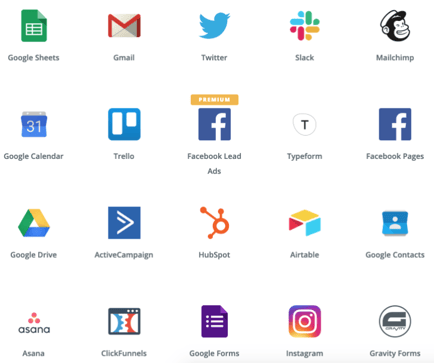
The other integrations we are most commonly asked about are as follows. We integrate with all these platforms (and more) through Zapier.
Quickbooks
Salesforce
Google Sheet
Donor Perfect
Access
SQL
Airtable
Non-profits or charities receive a preferential price on Zapier. See their pricing page to determine which plan is right for you.
See Integrating Zeffy with Zapier for the full setup.
viaSocket works the same way for a broader catalog: it connects Zeffy data (contacts, campaigns, and payments) to more than 2,300 apps using your Zeffy API key.
Zeffy API and webhooks (custom integrations)
The Zeffy API gives you read access to your payments, contacts, and campaigns, and webhooks notify your system when something happens in your account. Use it to sync donations to an accounting system in real time, keep a CRM up to date, build custom dashboards, or automate thank-you workflows. Only admins can generate an API key, from Settings > Integrations. See Get Started With the Zeffy API, or the full API documentation for every endpoint and parameter.
Claude and ChatGPT (AI assistants)
Two options let you ask questions about your fundraising data in plain language:
Claude or ChatGPT connector: connect your Zeffy organization to Claude or ChatGPT and ask things like "How much did we raise this quarter?" Access is read-only by default, and only an Owner of the Zeffy organization can make the connection. See Connect Zeffy to Claude or ChatGPT.
Zeffy AI Assistant in ChatGPT: a custom GPT that answers questions about your account. It requires a paid ChatGPT account and is read-only. See Using the Zeffy AI Assistant in ChatGPT.
Website and tracking options
These options put Zeffy on your website or measure your traffic, rather than moving Zeffy data into another tool:
WordPress plugin: add a Zeffy donate button to a WordPress site.
Campaign embeds: embed a Zeffy campaign on any website. See How to embed your Zeffy campaign on your website.
Google Analytics: track unique visits and traffic sources for a Zeffy form. US-based accounts only; see How can I integrate Zeffy with Google Analytics?
Meta Pixel: track campaign conversions through a custom thank-you-page redirect. See Use Meta Pixel with Zeffy campaigns.