
Export or download all payments or tickets associated with a specific form
About this Export:
There are now two export options available: "Payments" and "Itemized Payments", allowing you to choose the level of detail you need in your reports.
About the Export Options
Payments Export:
Includes transaction-related columns in the following order: Amount > Payment method > Payment status > Payout date > Donation > Refunded amount > Discount > Followed by buyer details
Itemized Payments Export:
Includes all payment information plus item-specific details such as: Ticket number, Ticket URL, Scan date, Last scan, Notes, In honor of, Answers to custom questions
To export the list of all your payments:
Log into your Zeffy account on a computer
Click on "Payments" in the left-hand navigation menu
Filter your data:
Select specific forms if needed
Choose the date range you want to export

Click the "Export" button in the top right corner
Choose your export type:
Select "Payments" for transaction-level details
Select "Itemized Payments" for item-specific information
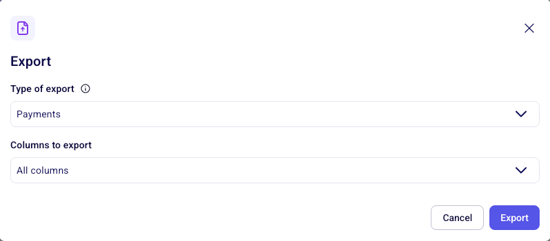
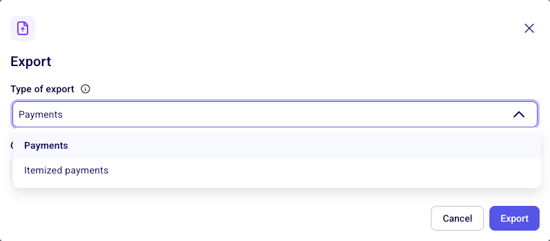
Under Columns to export:
Choose "All columns" to export all available data
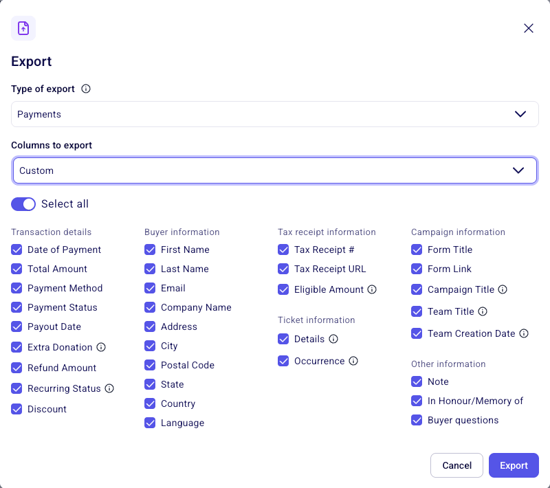
Select "Custom" to pick specific columns to export
Select your column preferences:
Export email delivery: If your file is too large for immediate download, it will be emailed to the address you're currently logged in with—typically within a few minutes.
If you share your Zeffy account with multiple users, make sure you're logged in with your own email address. The export always goes to the currently logged-in user's email.
Not receiving your export email? See troubleshooting steps in Reports and exporting data.