
How to validate or verify your email address
Before you can start editing, sending and scheduling emails to your contacts on Zeffy, you will need to link your bank account and verify your email address. This article explains the steps to complete this process.
Linking a bank account is a mandatory security measure to prevent our free emailing tools from being used for phishing or fraudulent purposes. It verifies the legitimacy of your organization, even if the event is free.
When trying to send an email, you will be prompted to link your bank account:
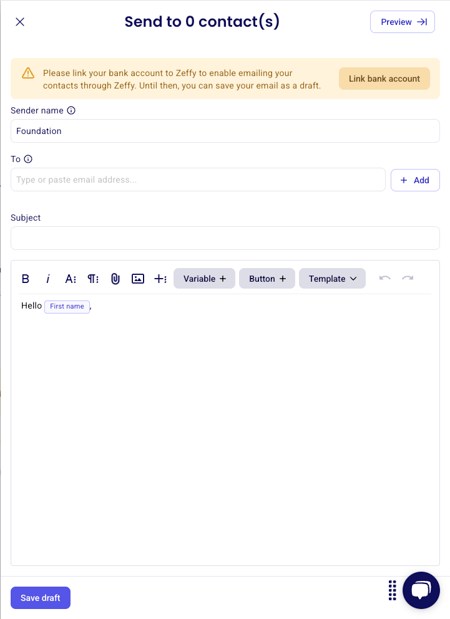
Steps to link your bank account:
Click on your name in the top left corner
Click on "Settings"
Under "Bank", click on "Bank Account"
Enter your bank account information:
Transit number
Institution number
Account number
To complete the verification process, follow the steps in this article about the Stripe verification process
Once your bank account is linked, you'll need to verify your email address:
Navigate to "Communications" in the left menu
Look for the yellow warning banner at the top of the page which will prompt you to verify your email address
Click on the verification link in the banner
Check your email inbox - a verification email will be sent to the email address of the account admin
Follow the steps in the verification email to validate your email address
Once your email is verified, you'll be able to:
Send emails to your contacts
Schedule email communications
Track email performance metrics like opens and clicks
Create email templates