
How can I initiate a payout?
Currently, you cannot manually trigger a deposit of your funds into your connected bank account to receive an expedited payout. The quickest way to receive your funds is by setting yourself up for weekly payouts!
💡 If you'd like to see more flexibility in your payout schedule, you can vote for this feature request here. Your vote helps us prioritize platform improvements for future implementation!
Payout Schedule Options
Weekly Schedule (Default): Funds are deposited every Monday
Monthly Schedule: Funds are deposited on the first Monday of each month
Important: Payouts cannot be manually triggered or expedited. The fastest available option is the weekly schedule.
How to Change Your Payout Schedule
Log into your Zeffy dashboard on a computer
Click your name in the bottom left of the page
Select "Settings"
Under the "Bank" section, click "Payout schedule"
Choose either weekly or monthly schedule
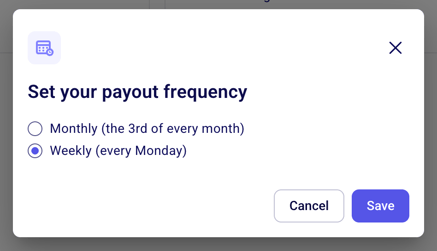
Click "Save"
Processing Timeline
Payments undergo a 1-3 day processing period for anti-fraud security measures
For weekly schedules:
Payments are initiated every Friday
Funds are deposited the following Monday
Payments received late Thursday through weekend may roll to next week's payout
For monthly schedules:
Payments received 3-4 days before the monthly payout may roll to next month
Monitoring Your Payouts
For more clarity on your upcoming payout, You can track your payout status under "Bank" > "Payouts" where you'll see the totals of the funds which are still processing and how much is already available for your next payout.
You can track your payout status under "Bank" > "Payouts" where you'll see the totals of the funds:
The amount ready to be paid out
The amount which is still processing

After initiation, it typically takes 1-2 business days for funds to appear in your bank account
🌟 For step-by-step details about how payouts work, you can find our comprehensive guide here: