
Set suggested donation amounts and custom amount options
When you create a donation campaign, you can customize how donors select their gift amount. This includes setting suggested donation amounts, choosing which giving frequencies to offer, and configuring default selections.
Suggested donation amounts
All Zeffy donation forms display four suggested donation amounts at the top of the amount selector. Donors can click one of these suggestions or enter a custom amount in the open text field below.
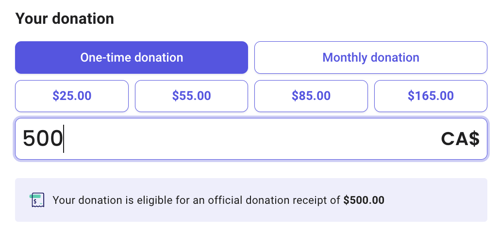
Key details:
You can edit the four suggested amounts, but you cannot add more or remove any. The form always shows exactly four suggestions.
Each suggestion can include an optional impact description that appears when the donor clicks that amount.
If smart amounts are toggled on, impact descriptions will not appear for donation amounts.
Because Smart Amounts automatically adjust the suggested donation amounts shown to each donor, it isn’t possible to tie a specific impact description to a fixed amount.
Donors always have access to a custom amount field — they can enter any amount they choose, regardless of the suggestions displayed.
Giving frequencies
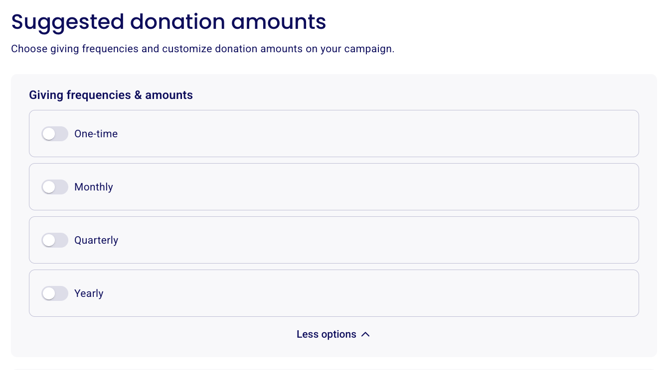
You can activate any combination of these giving frequencies:
One-time
Monthly
Quarterly
Yearly
For each active frequency, you can set different suggested amounts tailored to that giving schedule.
Default settings
Default amount
By default, the third suggested amount is pre-filled when a donor opens your form. This gives donors a natural starting point while still allowing them to change it.
If you prefer not to pre-fill any amount, you can expand the "default" view and toggle off "Use the 3rd choice as a default amount" in the suggested amounts section.
Default frequency
You can set one of your active frequencies to be pre-selected when the form loads. For example, if you want to encourage monthly giving, you can set "Monthly" as the default frequency.
Only frequencies you've activated will be available as default options.
Show only the custom amount field
If you prefer not to display suggested amounts, you can create a form with only the custom amount field visible:
Open your donation campaign in the form editor.
Navigate to the "Suggested Amounts" section.
Toggle off all giving frequencies (one-time, monthly, quarterly, yearly).
Save your changes.
When all frequencies are toggled off, your form will display only a custom amount field for one-time donations.
Note: When you remove suggested amounts, recurring options (monthly, quarterly, yearly) are also removed. Donors will only be able to make one-time gifts.