
If you see the error “Oops! Looks like you haven't added Zeffy as a donation partner on your Swiftaid account yet” when checking your Swiftaid connection in Zeffy, it usually means there’s an issue with the HMRC identifier saved in your Zeffy settings.
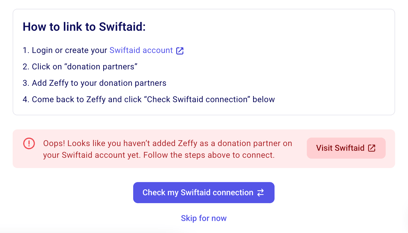
This error typically occurs when your Zeffy account settings contain your charity regulator number instead of your HMRC identifier. While these numbers may seem similar, they serve different purposes:
- Charity Regulator Number: A series of digits only, used for general charity registration
- HMRC Identifier: Two letters followed by five digits (for example, XR73793), used specifically for tax and Gift Aid purposes
If the number in your Zeffy account settings is your Charity Regulator Number instead of your HMRC Identifier, this will cause the connection to fail.
Here's how to resolve this:
Step 1: Update Your HMRC Identifier in Zeffy Settings
-
Log into your Zeffy account
-
Click on your name in the bottom left corner of your dashboard and then on "Settings"
-
In your settings, click "Organization Information" and locate the HMRC number field
-
Enter your HMRC identifier
-
⚠️ Make sure you are entering your HMRC identifier, not your charity regulator number. Your HMRC identifier should be two letters followed by five digits.
-
-
Save your changes
Step 2: Re-establish Your Swiftaid Connection
-
While still in your Zeffy Settings, under the Organization section, click "Link to Swiftaid"
-
Click on "Check my Swiftaid connection" again to verify the connection is successful. If all was updated correctly, you should get a green success message confirming the connection.